Showing posts with label editing. Show all posts

Monday, June 26, 2017

Posted by beni in , , , , | June 26, 2017

5DFly Free Photo Editing Viewer


Fly Free Photo Editing & Viewer is another 5DFly photo software product and its totally FREE.
Using Fly Free Photo Editing & Viewer software, freeware runs on windows with Mac style skin, you can view, edit, enhance and manipulate your pictures easily. It provides a much easier way to view, edit and share multiple photos simultaneously in multiple tabs.
Key features include batch resize, batch photo slideshow PowerPoint, upload Flickr/Google/Facebook, convert entire web page from HTML to image and powerful editing tool like crop, resize, RGB, gray scale, bright, contrast, rotate, add text, remove red eye and more.
Features detail:

- Manager: Apple style interface, add to favorite, organize your photo easily
- Viewer: Multiple tabs style, view your folders photos, slideshow, full screen, copy image to clipboard
- Editor: resizing, brightness and color adjustment, adding text, cropping, red eye removal, rotate,gray
- Batch resize: Batch resize multiple photos
- Print: Print portrait shot with user-defined size and format
- Photo slideshow PowerPoint: Batch import photos to a PowerPoint file
- HTML to JPG: Convert a homepage entirely to a image file
- Share Photo: Send photos via MSN or Upload photos to Google space, Flickr, Facebook without leaving the application


License : Freeware 


Download 5DFly Photo Free Photo Editing & Viewer (9.8 MB) : Here


Wednesday, May 24, 2017

Posted by beni in , , , , , , , , | May 24, 2017

6 Simple Photoshop Tips to Improve Photo Editing Skills


Many people like to edit their picture after capturing it using their camera. If you love to edit photo, then you must know about Photoshop. It is very popular among users. It allows users to turn their normal photo into high quality photo. It includes various tools using which you can edit your photos efficiently. Several tricks are there using which you can improve your photo editing skills. Below are some simple Photoshop tips you should know.
1. Tips to get glowing eyes in picture

Tips to get glowing eyes in picture
Have you ever wanted to get glowing eyes in picture? You might be searching a way to get glowing eyes while editing photo using the Photoshop. You have to find two tools such as dodge and burn. These are available in this app. The first tool can be used to lighten the iris and the second tool can be used to darken its border. In this way you can get glowing eyes.
2. Tips to get lighting effect
Tips to get lighting effect
You may have wanted to add lighting effect to your photo while editing it using this app. It allows users to improve the quality of picture. For this you have to follow some simple steps. First, you have to duplicate a layer after opening the picture. Then, you have to choose �Screen� as the blending mode of the new layer. You have to select Gaussian Blur from the list. You can find it under Filter. It will provide you an option to enter the value. Then, you have to choose Multiply as the blending mode. It this way you can add lighting effect to your photo.
3. Tips to sharpen your picture
Tips to sharpen your picture
Sometimes you may have wanted to improve the quality of your picture by sharpening it. You can fulfill your desire by using some simple steps. First, you have to duplicate a layer after opening the picture. Then, you have to choose �Overlay� as the blending mode of the new layer. You have to select high pass filter from the list. You can find it under Filter. It will allow you to sharpen your picture by dragging the slider.
4. Tips to punch up saturation
Tips to punch up saturation
Have you ever wanted to punch up saturation? You might be searching a way to punch up saturation while editing photo using this app. It allows users to improve the quality of picture. You can easily do it by following some simple steps. First, you have to duplicate a layer after opening the picture. Then, you have to choose �Hard Light� as the blending mode of the new layer. It will allow you to punch up saturation. You can also adjust it by turning down the opacity.
5. Tips to draw straight lines
Sometimes you may have wanted to draw a straight line on the picture while editing it using this app. You can do it easily without any issue. For this, you have to draw straight lines using paintbrush tool while pressing and holding the shift button.
6. Tips to reduce the shiny appearance of the skin
You may have seen shiny appearance in some pictures. There is an easy way using which you can reduce the shiny appearance of the skin. You have to use a tool named eyedropper for this process. First, you have to choose non-shiny skin area using this tool. Then, you have to use the brush to paint over the shiny areas to reduce the shiny appearance.
Have you ever faced any difficulty in using Photoshop app? It is expected that the above simple tips will improve your photo editing skills. If you are facing any difficulty in using these tips, then feel free to ask us in the comment section below. [Via: Buzzfeed]

Saturday, April 1, 2017

Posted by beni in , , , , , , | April 01, 2017

5 Software Editing Video Gratis Terbaik 2013


Sedang belajar cara mengedit video ? bingung pilih software untuk edit video yang bagus dan mudah di gunakan ? berikut 5 software editing video gratis terbaik 2013 untuk platform windows XP, 7 dan 8, yang bisa menjadi pilihan anda semua.

5 Software Editing Video Gratis Terbaik 2013

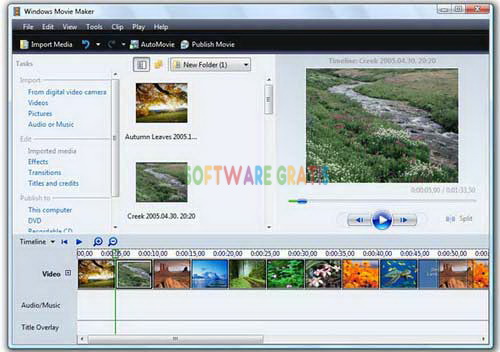
1. Windows Movie Maker 2012

software edit video - wmm 2012

Windows Movie Maker adalah video editing tool gratis untuk Windows yang ada sejak windows XP dan pengguna dapat mengedit video dengan mudah dan cepat tinggal drag and drop. memiliki fitur seperti video effects, video transitions, adding titles/credits, audio track, timeline narration, dan Auto Movie.
Download

2. Video Pad

software edit video - video pad

Video Pad memiliki fitur fitur standart video editor. Namun, ada kelebihan dari software ini yang jarang dimiliki video editor lainnya. Video editor ini mampu mengedit video berkestensi .3gp yang umumnya output-an dari HandPhone. Selain kelebihan tersebut, software ini mampu mengedit dari camcorder manapun. VideoPad juga menyediakan lebih dari 50 visual dan transisi efek untuk menambah sentuhan ke video Anda
Download

3. Avidemux

software edit video - avidemux

Avidemux software open source editor video yang dapat membantu Anda menggabungkan video klip, memotong video (tanpa re-encoding), dan menambahkan Logo, memotong/ cut, putar, mengubah ukuran, mempertajam, menghilangkan noise/ kebisingan, tweak kecerahan, kontras warna dan banyak lagi.
Download

4. VSDC Free Video Editor

software edit video - VSDC

Video editor ini dimaksudkan untuk mengedit file video dan membuat video dari setiap kompleksitas yang melibatkan berbagai efek visual dan audio. memiliki banyak fungsionalitas dengan antarmuka yang sederhana dan intuitif, memungkinkan Anda untuk membuat video dengan mudah dan cepat.
Download

5. Free Video Dub

software edit video - video dub

Free Video Dub - software video editing yang memungkinkan Anda menghapus bagian yang tidak diinginkan dari file video tanpa re-encoding. dan tetap  mempertahankan kualitas asli file video input dan menghapus bagian yang tidak di perlukan dengan mudah dan cepat.
Download

Kesimpulan nya bahwa software buat edit video itu banyak, tapi yang membedakan nya dalah fitur dari masing-masing software tersebut, dan di atas merupakan software editing video gratis terbaik dari hasil search admin, dan admin recomend nya untuk pemula pake WMM (windows movie maker) saja soal mudah banget di gunakan, ok silahkan berkreasi dengan video anda, dan semoga bermanfaat.

Jika ada masukan untuk admin atau sekedar bertanya silakan berkomentar melalui kotak komentar di bawah ini, Thanks.

Search