Showing posts with label cool. Show all posts

Thursday, June 15, 2017

Posted by beni in , , , , , , | June 15, 2017

6 Cool Internet Radio Players For Linux


There are quite a few Linux applications that can play Internet radio, but I thought Id make a list of some of the most interesting apps that focus on this.

The list includes lightweight Internet radio players, a fully fledged desktop application, a command line radio browser and player, as well as a GNOME Shell extension.


Radio Tray


Radio Tray Linux

Radio Tray is a minimalist Internet radio player that sits in the system tray (it also supports Ubuntus AppIndicator). The application is not new, but I couldnt make a Radio Players post without it, since its a great lightweight radio player.

Radio Tray comes with a list of built-in radio stations, and allows you to easily add new ones. Theres no GUI for the actual player - the application is controlled from the tray/AppIndicator or using the media keys.

Radio Tray features:
  • comes with a built-in radio station list (though since the application hasnt been updated in a long time, some no longer work);
  • plays most media formats (based on gstreamer libraries);
  • configurable radio stations with a GUI;
  • extensible by plugins (current plugins include: Sleep Timer, Notifications, MATE and GNOME Media Keys and History);

I didnt list the playlists formats supported by Radio Tray, because Im not sure if all those listed on its SourceForge page still work. Thats because the application doesnt seem actively maintained, with the latest commit dating back to January, 2015.

For instance, playing ASX streams didnt work in my test under Ubuntu 16.10, even though this is listed as supported on the Radio Tray page (playing ASX streams works with RadioTray Lite - see below).

There are also reports that Radio Tray pauses sometimes and it appears this hasnt been fixed although I didnt encounter the issue.

Radio Tray is most likely available in your Linux distribution official repositories. In Debian, Ubuntu or Linux Mint, you can install it by using the following command:
sudo apt install radiotray python-xdg

Without installing python-xdg, the application will fail to start (and its missing as a dependency in most Ubuntu versions, like 16.04).


Radio Tray Lite


Radio Tray Lite Linux

Because Radio Tray doesnt seem actively maintained, I searched for an alternative and stumbled upon Radio Tray Lite. According to its developer, this is a Radio Tray clone, rewritten in C++.

Just like Radio Tray, this application uses GStreamer, so it should play most media formats, however, it lacks some of the features available in the original Radio Tray, like plugins support (so no media keys support, etc.) or a GUI to add new radio stations.

Radio Tray Lite ships with a radio list and to add new radio stations you must edit a file. The application uses the same bookmarks.xml (radio station list) syntax as Radio Tray, so if you already have a custom one, you could use that instead of its built-in list.

To add new radio stations, edit the ~/.config/radiotray-lite/bookmarks.xml file.

I should also add that using Radio Tray Lite, I was able to play ASX steams (as opposed to the original Radio Tray running in Ubuntu 16.10). So if Radio Tray fails to play some streams, give Radio Tray Lite a try.

Radio Tray Lite features:
  • runs on a Linux system tray / AppIndicator;
  • desktop notifications;
  • minimalist user interface;
  • plays most media formats (it uses gstreamer);
  • supports PLS, M3U, ASX, RAM, XSPF playlists;

To install Radio Tray Lite in Ubuntu 16.10, 16.04 or 14.04 / Linux Mint 18.x or 17.x, you can use the main WebUpd8 PPA. To add the PPA and install the application, use the following commands:
sudo add-apt-repository ppa:nilarimogard/webupd8
sudo apt update
sudo apt install radiotray-lite
If you dont want to add the PPA, grab the deb from HERE.

For installing Radio Tray Lite in other Linux distributions, bug reports, etc., see its GitHub page.


Gradio


Gradio Linux

Gradio is a GTK3 application for discovering and listening to Internet radio stations.

Gradio features:
  • uses radio-browser.info for its built-in radio station list;
  • filter radio stations by language, country/state or tag (which includes genres, etc.), as well as most popular;
  • after finding a radio station you like, you can easily add it to your library by starring it;
  • MPRIS v2 support (integrates with the Ubuntu Sound Menu, GNOME Shell, etc.);
  • optional desktop notifications;
  • connection popover that displays the used codec, bitrate, channel mode, etc.;
  • includes options to resume playback on startup, close to tray, enable background playback, use dark design, etc.

Gradio is the most complete Internet radio player in this list, but also the most heavy on system resources. Its also the best for discovering new online radio stations thanks to its extensive radio station database and filters.

The application does lack a feature though: it doesnt allow adding your own custom radio stations from the application user interface. The radio station must exist in the radio-browser.info database to be able to play it.

Ubuntu 16.10 and 16.04 / Linux Mint 18.x users can install the latest Gradio by using its official PPA:
sudo add-apt-repository ppa:haecker-felix/gradio-daily
sudo apt update
sudo apt install gradio
If you dont want to add the PPA, grab the deb from HERE.

For how to install Gradio in other Linux distributions, bug reports, etc., see its GitHub page.


GNOME Shell Internet Radio extension
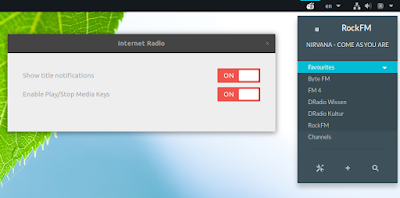

GNOME Shell Internet Radio extension

This may not be a stand-alone application, but its basically the Radio Tray equivalent for GNOME Shell, so I had to add it to this list.

GNOME Shell Internet Radio (or GNOME Shell Extension Radio) is a simple extension for listening to Internet radio streams, which supports GNOME Shell 3.18, 3.20 and 3.22.

The extension only ships with 4 Internet radio stations by default, but it provides a built-in search for http://www.radio-browser.info (radio directory), so you can easily add new radio stations from within the extension user interface. You can also add your own radio stations:

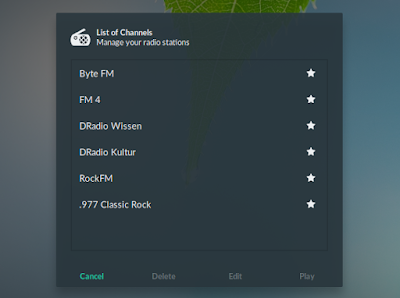
GNOME Shell Internet Radio extension

GNOME Shell Internet Radio extension

GNOME Shell Internet Radio extension features:
  • manage (add/edit/remove) radio stations;
  • mark stations as favorite;
  • built-in online radio directory search (it uses https://www.radio-browser.info);
  • middle click to start/stop last played station;
  • support for multimedia keys;
    • Play / Stop
    • Next / Prev cycles through the channels list;
  • optional desktop notifications;
  • cyrillic tag support.

Install Internet Radio extension from the GNOME Extensions directory or from source, from GitHub.


Curseradio


cursesradio

A Linux application list, even a small one like this one, wouldnt be complete without a command line alternative.

Curseradio is a command line Internet Radio browser and player which uses a curses interface, and mpv for audio playback. The tool makes use of the TuneIn directory found at http://opml.radiotime.com/ for its radio station list.

Unfortunately Curseradio doesnt support adding your own radio stations, however, the built in list is quite extensive and provides radio stations for any taste. Furthermore, the TuneIn directory it uses has a Local Radio section which tries to list radio stations based on your location.

Curseradio features:
  • interactive curses interface with radio categories, currently playing and bitrate information;
  • keyboard shortcuts (see its GitHub page for a list);
  • extensive built-in radio station list (via http://opml.radiotime.com/), including local radio stations;
  • supports adding stations to favorites (press "f" to add it to favorites), for quick access.

To install Curseradio in Ubuntu 16.10, 16.04 or 14.04 / Linux Mint 18.x or 17.x, you can use the main WebUpd8 PPA. Add the PPA and install the application using the following commands:
sudo add-apt-repository ppa:nilarimogard/webupd8
sudo apt update
sudo apt install curseradio
If you dont want to add the PPA, grab the deb from HERE.

For installing Curseradio in other Linux distributions, grab the source from its GitHub repository.


Goodvibes (later addition)


Goodvibes Radio Player

Update: Ive added Goodvibes to the list (thanks to Kimme for the Goodvibes tip!).

Goodvibes is a lightweight Internet radio player that provides a GTK3 interface, can be launched without a GUI, and it features a command line client that can be used to control it.

By default, the application doesnt ship with a large list of Internet radio stations, but more can be easily added.

Goodvibes features:
  • MPRIS v2 support;
  • multimedia keys;
  • desktop notifications;
  • sleep inhibition when a radio is playing;
  • command line client to control the app;
  • supports most formats thanks to GStreamer;

Most of these are disabled by default (like notifications, multimedia keys, etc.), and you must enable them from the application preferences.

The application can be used without an interface by launching it with the "--without-ui" command line argument or select "Close UI" from its menu, and it can be controlled either via command line (using "goodvibes-client"), or from a MPRIS v2 interface, such as the Ubuntu Sound Menu, GNOME Shell System Menu, and so on:


To install Goodvibes in Ubuntu 16.04 or Linux Mint 18.x by using its PPA, use the following commands:
sudo add-apt-repository ppa:elboulangero/goodvibes
sudo apt update
sudo apt install goodvibes
If you dont want to add the PPA or youre using a newer Ubuntu version (I tested it in Ubuntu 16.10 and I didnt encounter any issues), download the deb from HERE.

Unfortunately Goodvibes is not available for Ubuntu 14.04 (or older) / Linux Mint 17.x because it requires GStreamer 1.0, which was not available when those were released.

Arch Linux users can install Goodvibes via AUR.

For how to build Goodvibes from source, bug reports, etc., see the Goodvibes GitHub page.

Friday, June 9, 2017

Posted by beni in , , , , , , , , , | June 09, 2017

A cool article about Guerrilla Games and their office culture


This article popped up on Twitter today, and I loved it.  First off, it gives the name of the Fallout: New Vegas writer I couldnt remember on the podcast - John Gonzalez, who lead that writers team, and the one on Shadow of Mordor (meh!) - second, I had no idea Guerrilla had such an open, creatively-minded culture.  Third, I love this paragraph about how they ended up producing (what I determine to be) the most successfully-feminist triple-A video game Ive ever played.  And the answer is exactly what youd hope:
"Aloy was always a woman right from the initial concept. While no one at Guerrilla expresses any kind of agenda when it comes to gender equality, as technical lead Michiel van der Leeuw notes, there was an awareness that female leads in games are often sexualized � a precedent the team had no intention of following. "She had to be agile and athletic. Shes an outcast but shes also brought up lovingly," he says. "There were so many elements we had to balance to make her the person she is. I like that people have picked up on her teeth being a bit crooked, her face being asymmetrical � I think people pick up on her imperfections because shes a real person.""
The article gives a really excellent impression of Guerrilla, perhaps most notably from Horizon writer - and new Guerrilla hire - Gonzalez, who moved from the States to Amsterdam to join the team, and now refuses to leave.
"Ive seen a lot of things and experienced a lot of things in the industry that would lead you to become cynical and disillusioned. I dont find that to be the case here. I feel like the level of ambition here is really high, but I dont feel like the ambition is high for external reasons, like wanting to be masters of the universe. Its high because people really care about the quality of the product. I just feel like I dont want to step away from that, you know? This is a place where I can improve myself, can bring myself to the work. I want to stay as close to that as I can."
A nice example of this is the ants on the trees.  You may have seen a GIF or video of the leafcutter ants youll find on trees, here and there - it was kind of a big deal when the game first launched.

little details like this impress me, ants carrying leaves on a tree [Horizon Zero Dawn]


Yknow why those are in the game?
"Its a level of attention to detail most wont notice, but one Guerrilla appears to do without consideration � even to the point where animators took time out of their day to render ants climbing up tree trunks, all of their own volition. ... "They felt like the environment needed something to make it come alive.""
So yeah, check the article.  Sgood stuff.

Monday, May 8, 2017

Posted by beni in , , , , , , | May 08, 2017

5 Cool Recent Post Widgets for Blogger


For bloggers that pride themselves on always staying up-to-date with new content, a recent post widget for Blogger can be an invaluable tool. A recent post widget for blogger is in many ways similar to a breaking news alert that journalists love to use during their reports, providing the most recent and relevant posts that you have to offer.

Adding a recent post widget for Blogger helps to reduce the dependency on email marketing, because you dont have to send out an email just to let people know you made a new post. Instead, it updates automatically for everyone to see. You can then use this information to design scheduled email newsletters, and take advantage of whats often referred to as the Twitter effect where audiences will regularly check back on your site for the possibility that new posts are available. Without this, you force people to do run their own search for information and content, increasing the likelihood that theyll leave the site and hurt your bounce rate.

Once youve managed to attract visitors to one of your posts using the recent post widget for Blogger, it will continue to act as an accessible secondary resource to navigate around your site. That way, you can avoid having them sifting through old content that might be outdated. If youd rather show off some of your best posts instead of your most recent posts, you can do that instead, or add that feature to the bar with just a few alterations.

Apart from looking great and taking up minimal space, there are too many benefits for you not to have a recent post widget for Blogger. The best part about these add-ons is that they come in a wide variety of designs that will fit any theme. If youre interested in adding a widget to your site, here are 5 cool recent post widgets that might catch your eye and fit perfectly with your Blogger template:


Style #1

rainbow widget, recent posts
<script style="text/javascript" src="http://helplogger.googlecode.com/svn/trunk/helplogger/recentpoststhumbs.js"></script>
<script style="text/javascript">
var posts_no = 5;
var showpoststhumbs = true;
var readmorelink = true;
var showcommentslink = false;
var posts_date = true;
var post_summary = true;
var summary_chars = 70;
</script>
<script src="/feeds/posts/default?orderby=published&alt=json-in-script&callback=showlatestpostswiththumbs"></script>
<a style="font-size: 9px; color: #CECECE; float: right; margin: 5px;" href="http://softwareduck.blogspot.com/2015/05/5-cool-recent-post-widgets-for-blogger.html" rel="nofollow">Recent Posts Widget</a>
<noscript>Your browser does not support JavaScript!</noscript>
<link href=http://fonts.googleapis.com/css?family=Ubuntu+Condensed rel=stylesheet type=text/css />
<style type="text/css">
img.recent-post-thumb {width:50px;height:50px;float:right;margin: 5px -5px 0px 0px; border-radius: 100%; padding: 3px;background: #fff}
.recent-posts-container {font-family: Ubuntu Condensed, sans-serif; float: left;width: 100%;min-height: 55px;margin: 5px 0px 5px 0px;padding: 0;font-size:12px;}
ul.recent-posts-container {list-style-type: none; background: #fff;padding: 0px; }
ul.recent-posts-container li:nth-child(1n+0) {background: #F49A9A; width: 100%}
ul.recent-posts-container li:nth-child(2n+0) {background: #FCD092; width: 95%}
ul.recent-posts-container li:nth-child(3n+0) {background: #FFF59E; width: 90%;}
ul.recent-posts-container li:nth-child(4n+0) {background: #E1EFA0; width: 85%;}
ul.recent-posts-container li:nth-child(5n+0) {background: #B1DAEF; width: 80%;}
ul.recent-posts-container li {padding:5px 10px;min-height:50px; list-style-type: none; margin: 0px 5px -5px 5px; color: #777;}
.recent-posts-container a { text-decoration:none; }
.recent-posts-container a:hover { color: #222;}
.post-date {color:#e0c0c6; font-size: 11px; }
.recent-post-title a {font-size: 14px;color: #444; font-weight: bold;}
.recent-post-title {padding: 6px 0px;}
.recent-posts-details a{ color: #222;}
.recent-posts-details {padding: 5px 0px 5px; }
</style>

Style #2

recent posts widget
<div class="recentpoststyle">
<script src="http://helplogger.googlecode.com/svn/trunk/helplogger/recentposts.js"></script>
<script>
var posts_no = 5;var posts_date = true;var post_summary = true;var summary_chars = 80;</script>
<script src="/feeds/posts/default?orderby=published&amp;alt=json-in-script&amp;callback=showlatestposts">
</script><a style="font-size: 9px; color: #CECECE; float: right; margin: 5px;" href="http://softwareduck.blogspot.com/2015/05/5-cool-recent-post-widgets-for-blogger.html" rel="nofollow">Recent Posts Widget</a>
<noscript>Your browser does not support JavaScript!</noscript>
<style type="text/css">
.recentpoststyle {counter-reset: countposts;list-style-type: none;}
.recentpoststyle a {text-decoration: none; color: #49A8D1;}
.recentpoststyle a:hover {color: #000;}
.recentpoststyle li:before {content: counter(countposts,decimal);counter-increment: countposts;float: left;z-index: 2;position:relative;font-size: 20px;font-weight: bold;color: #fff;background: #69B7E2; margin: 15px 5px 0px -6px; padding: 0px 10px; border-radius: 100%;}
li.recent-post-title { padding: 5px 0px;}
.recent-post-title { font-family: "Avant Garde",Avantgarde,"Century Gothic",CenturyGothic,AppleGothic,sans-serif;}
.recent-post-title a {color: #444;font-size: 13px; text-decoration: none; padding: 2px; font-weight: bold;}
.post-date {padding: 5px 2px 5px 30px; font-size: 11px; color: #999; margin-bottom: 5px;}
.recent-post-summ { border-left: 1px solid #69B7E2; color: #777; padding: 0px 5px 0px 20px; margin-left: 11px; font-family: Garamond,Baskerville,"Baskerville Old Face","Hoefler Text","Times New Roman",serif; font-size: 15px;}
</style></div>

Style #3

recent posts gadget


<script style="text/javascript" src="http://helplogger.googlecode.com/svn/trunk/helplogger/recentpoststhumbs.js"></script>
<script style="text/javascript">
var posts_no = 5;
var showpoststhumbs = true;
var readmorelink = true;
var showcommentslink = true;
var posts_date = true;
var post_summary = true;
var summary_chars = 70;</script>
<script src="/feeds/posts/default?orderby=published&alt=json-in-script&callback=showlatestpostswiththumbs"></script>
<a style="font-size: 9px; color: #CECECE; float: right; margin: 5px;" href="http://softwareduck.blogspot.com/2015/05/5-cool-recent-post-widgets-for-blogger.html" rel="nofollow">Recent Posts Widget</a>
<noscript>Your browser does not support JavaScript!</noscript>
<link href=http://fonts.googleapis.com/css?family=Oswald rel=stylesheet type=text/css/>
<style type="text/css">
img.recent-post-thumb {padding:2px;width:65px;height:65px;float:left;margin: 0px 10px 10px; background: #fff; border: 1px solid #69B7E2;}
.recent-posts-container {font-family: Oswald, sans-serif;  float: left;width: 100%;min-height: 70px;margin: 5px 0px 5px 0px;padding: 0;font-size:12px;}
ul.recent-posts-container li {padding:5px 0px;min-height:65px; list-style-type: none; margin-bottom: 5px;}
ul.recent-posts-container {counter-reset: countposts;list-style-type: none;}
ul.recent-posts-container li:before {content: counter(countposts,decimal);counter-increment: countposts;z-index: 2;position:absolute; left: 15px; font-size: 13px;font-weight: bold;color: #fff;background: #69B7E2;padding: 4px 10px; border-radius: 100%;}
.recent-posts-container a { text-decoration:none; }
.recent-post-title a {font-size: 13px; text-transform: uppercase; color: #2aace3;}
.recent-posts-details {margin: 5px 0px 0px 92px; }
.recent-posts-details a{ color: #777;}
</style>

Style #4

recent posts for blogger, cool widgets
<script style="text/javascript" src="http://helplogger.googlecode.com/svn/trunk/helplogger/recentposts2.js"></script>
<script style="text/javascript">
var posts_no = 5;
var showpoststhumbs = false;
var readmorelink = true;
var showcommentslink = true;
var posts_date = true;
</script>
<script src="/feeds/posts/default?orderby=published&alt=json-in-script&callback=showlatestpostswiththumbs"></script>
<a style="font-size: 9px; color: #CECECE; float: right; margin: 5px;" href="http://softwareduck.blogspot.com/2015/05/5-cool-recent-post-widgets-for-blogger.html">Recent Posts Widget</a>
<noscript>Your browser does not support JavaScript!</noscript>
<link href=http://fonts.googleapis.com/css?family=Oswald rel=stylesheet type=text/css/>
<style type="text/css">
img.recent-post-thumb {padding: 2px; width:35px;height:35px;float:right;margin: -14px 0px 0px 5px; border: 1px solid #cea5ac; border-radius: 10%;}
.recent-posts-container {font-family: Oswald, sans-serif;  float: left;width: 100%;min-height: 70px;margin: 5px 0px 5px 0px;padding: 0;font-size:12px;}
ul.recent-posts-container li {padding:5px 0px;min-height:65px; list-style-type: none; margin: 0px 10px 5px 35px;}
ul.recent-posts-container {counter-reset: countposts;list-style-type: none;}
ul.recent-posts-container li:before {content: counter(countposts,decimal);counter-increment: countposts;z-index: 2;position:absolute; left: 5px; font-size: 16px;color: #4D4D4D;background: #F7F7F7;padding: 9px 14px; border: 1px solid #efefef;}
.recent-posts-container a { text-decoration:none; }
.recent-posts-container a:hover{color: #4DACE3;}
.post-date {color:#e0c0c6; font-size: 11px; }
.recent-post-title a {font-size: 13px; text-transform: uppercase; color: #5C4D4D;}
.recent-post-title { margin: 5px 0px; }
.recent-posts-details {border-top: 4px solid #AC707A; margin-top: 5px; padding-top: 5px;}
.recent-posts-details a{ color: #888;}
a.readmorelink {color: #4DACE3;}
</style>

Style #5

recent posts, blogger gadget
<script style="text/javascript" src="https://helplogger.googlecode.com/svn/trunk/helplogger/recentposts2.js"></script>
<script style="text/javascript">
var posts_no = 5;
var showpoststhumbs = true;
var readmorelink = true;
var showcommentslink = true;
var posts_date = true;
</script>
<script src="/feeds/posts/default?orderby=published&alt=json-in-script&callback=showlatestpostswiththumbs" rel="nofollow"></script>
<a style="font-size: 9px; color: #CECECE; float: right; margin: 5px;" href="http://softwareduck.blogspot.com/2015/05/5-cool-recent-post-widgets-for-blogger.html" rel="nofollow">Recent Posts Widget</a>
<noscript>Your browser does not support JavaScript!</noscript>
<link href=http://fonts.googleapis.com/css?family=Lobster|Gloria+Hallelujah rel=stylesheet type=text/css />
<style type="text/css">
img.recent-post-thumb {width:50px;height:50px;float:right;margin: -4px -35px 0px 0px; border: 4px solid #FCD6CB; border-radius: 100%;}
.recent-posts-container {font-family: Gloria Hallelujah, cursive;  float: left;width: 100%;min-height: 55px;margin: 5px 0px 5px 0px;padding: 0;font-size:12px;}
ul.recent-posts-container {counter-reset: countposts;list-style-type: none; background: #fff; }
ul.recent-posts-container li:before {content: counter(countposts,decimal);counter-increment: countposts;z-index: 2;position:absolute; left: -20px; font-size: 16px;color: #616662;background: #FCD6CB;padding: 9px 14px; border-radius: 100%; margin-top: 15px;}
ul.recent-posts-container li {padding:5px 0px;min-height:50px; list-style-type: none; margin: -2px 5px 5px 5px;  border-top: 2px solid #FCD6CB;}
ul.recent-posts-container {border: 2px solid #FCD6CB; }
.recent-posts-container a { text-decoration:none; }
.recent-posts-container a:hover { color: #222;}
.post-date {color:#e0c0c6; font-size: 11px; }
.recent-post-title a {font-size: 14px;color: #616662;}
.recent-post-title {padding: 6px 0px;}
.recent-posts-details a{ color: #888;}
.recent-posts-details {padding-bottom: 5px;}
a.readmorelink {color: #4DACE3;}
</style>


How to Add Recent Posts Widget on Blogger

Want to add one of the styles above? Just follow the following steps below:

Step 1. Log in to your Blogger dashboard and click on your blog
Step 2. Go to "Layout" and click the "Add a gadget" link on the right side
Step 3. From the pop-up window, scroll down and select the "HTML/JavaScript" gadget:


Step 4. Paste the code of the chosen widget found below it.
Step 5. Hit the "Save" button... and thats it!


Keep Your Blog Updated

Using a recent post widget for Blogger can truly benefit you and improve your skill as a blogger. As you can see, these designs can look great on Blogger sites, but they do act a little bit like a progress report for the author. If you start to fall behind, the dates on your recent post widget will definitely give you away.

Set a schedule and make sure that you are making regular posts on the blog. These posts will be automatically updated on your widget and readers can view this information whenever they want. Add your recent post widget for Blogger on the every page of the blog or in your template so that these posts can encourage others to continue reading, thus increasing the total time spent on your site. 

Tuesday, April 18, 2017

Posted by beni in , , , , , , , , | April 18, 2017

5 Cool Sites for buying Computers Preinstalled with Linux


Dell has all but bowed to pressure from Microsoft to torpedo its Ubuntuline of computers. Add that to the relative success of Windows 7 among Redmonds user base and you get a clearer picture of what is going on.
In case you are wondering, there are still lots of other vendors that offer a choosy range of machines preinstalled with Linux for your convenience. The following 5 are just a sample of the lot
ThinkPenguin
This site has a respectable array of desktop and laptop computers fitted with Ubuntu Linux ready for use. Prices start from $399 and you can also customize each machine to fit your hardware specification tastes at an extra price. They also other Linux peripherals like audio players (another name for iPod), cameras, printers among others.
Linux Certified
This site also has a range of laptops that ship with either of six distros namely Ubuntu, RedHat, Centos, OpenSuse, Fedora and Oracle Linux.
All the machines are also customizable to your taste for extra bucks. They also offer an optional dual-boot configuration with Windows for those who need the latter for special reasons.
ZaReason
One of the most popular Ubuntu centric OEMs out there, ZaReason stocks a wide array of machines; desktops, laptops and servers to suit various needs and specifications.They also stock some peripherals to add some spice to your machine.
Emperor Linux
According to this company
"EmperorLinux provides Linux laptops with full hardware support under Linux. Since 1999, we have supplied systems to a wide range of customers, including engineers, physicists, mathematicians, and astronomers at over 50 different government labs and over 200 universities. We have supplied hundreds of corporate clients, as well. If you use Linux in these environments, EmperorLinux is your sole source."
System76
Another of the well known Ubuntu centric manufacturers, System76 has some of the widest assortment of Linux machines out there. Their flagship machine, the Serval Professional is a machine that will make any geek go green with envy.
There are a lot more niche manufacturers that gladly ship computers preloaded with Linux. They may not have the clout of Dell, but they do a good job of giving you value for money and from what I have read, unparalleled support in your use of their machines.  If you ever think of buying a Linux machine, you might want to give any of these a try!

via [http://www.ghabuntu.com/2010/07/5-cool-sites-for-buying-computers.html]

Saturday, April 8, 2017

Posted by beni in , , , , , , , , | April 08, 2017

5 Cool Gadgets to Make Your Air Conditioner Smarter


5 Cool Gadgets to Make Your Air Conditioner Smarter

We�re in the age of technology. Inventions, gadgets, science, just keeps getting better. Because of that, more and more people have found a way to make life easier for everyone else. We have refrigerators that can make grocery lists now. We can control every inch of our homes, even when we�re on the other side of the world. Would make a lot sense that somebody out there wanted to make our air conditioners smarter.

There are some incredible cool gadgets out there that can take of average air conditioners and turn them into smart pieces of technology. Here�s a couple that you should learn to know.

Thursday, April 6, 2017

Posted by beni in , , , , , , | April 06, 2017

5 Cool Websites to Play Chess Online !


Chess is one of ancient game that is played since ages by intellectuals and common people alike. Playing chess requires skills and acquit concentration. It also helps in improving once strategies and decision making power. Chess is played between two players so if you do not have an opponent to play with you can always find one on Internet. Internet is one large community with millions of users online at any time. There are some dedicated sites for playing chess online where you can find players to play with. If there are no players then you can always play the game against computer.

Here are 5 cool sites where you can play chess with people around the world or with some of the smartest computers. Challenge opponents, know new tricks, and get tips, play chess tournaments and more on these sites for free.

Chess Here

Chess Here is one of the coolest sites to play chess online. There are hundreds of users online from all over the world in this site. You need to register with the site to play chess, it complete in few seconds and it is completely free. After you have registered you can play real time chess or correspondence chess which gives a way new experience of playing chess. In real time chess you can play chess quickly with real people. Whereas correspondence chess is slow version which does not have time limit so it may take hours or days to finish a game.

You can interact with other players while you play on this site, take advises and suggest moves to others. For free membership you can play up to 5 games per day if you wish to play more then you can upgrade your account according to your choice.

Gameknot

Gameknot is one another special place to play chess online. You can create an account for free to access limited features or have a premium membership to have premium access. You can challenge real people from around the world or play with computer. In the monthly tournaments you can compete with many people to improve your chess skills. You can have teams and clubs in Gameknot this gives you an opportunity to make friends and also interact with them online.

Chess Hounds

Chess Hounds is a completely free online chess community where you can join and play for free. All that you have to do is register with the site and start playing chess with real people from all over the world. If there are now people available then you can always compete with computer to improve your skills. In this site you can also watch live game of others and export games as PNG format.

Yahoo Games

Yahoo offers various services for free and Yahoo games are one of those free service. In Yahoo games you can find chess section where hundreds of users from all around the world play chess with one another online. Best thing is you can play chess even from Yahoo messenger while chatting with your friends. You can invite your friends to play chess instantly or play with a new player to make friends. As it is completely free and you can play has many games as you would like to play.

Chess.com

Chess.com is completely dedicated for chess so you can sign in for free. There will be hundreds of players from various countries playing chess in this site. You can play online and live chess with real people from various countries. When you click on play live chess you can see invitations from number of people online. Accept invitation to play with that player it will be so real and interesting, with chat, play one to one.

Also checkout our List of Top Sites to Watch TV Channels Online

Wednesday, April 5, 2017

Posted by beni in , , , , , , | April 05, 2017

5 Cool Internet Radio Players For Linux


There are quite a few Linux applications that can play Internet radio, but I thought Id make a list of some of the most interesting apps that focus on this.

The list includes lightweight tray Internet radio players, a fully fledged desktop application, a command line radio browser and player, as well as a GNOME Shell extension.


Radio Tray


Radio Tray Linux

Radio Tray is a minimalist Internet radio player that sits in the system tray (it also supports Ubuntus AppIndicator). The application is not new, but I couldnt make a Radio Players post without it, since its a great lightweight radio player.

Radio Tray comes with a list of built-in radio stations, and allows you to easily add new ones. Theres no GUI for the actual player - the application is controlled from the tray/AppIndicator or using the media keys.

Radio Tray features:
  • comes with a built-in radio station list (though since the application hasnt been updated in a long time, some no longer work);
  • plays most media formats (based on gstreamer libraries);
  • configurable radio stations with a GUI;
  • extensible by plugins (current plugins include: Sleep Timer, Notifications, MATE and GNOME Media Keys and History);

I didnt list the playlists formats supported by Radio Tray, because Im not sure if all those listed on its SourceForge page still work. Thats because the application doesnt seem actively maintained, with the latest commit dating back to January, 2015.

For instance, playing ASX streams didnt work in my test under Ubuntu 16.10, even though this is listed as supported on the Radio Tray page (playing ASX streams works with RadioTray Lite - see below).

There are also reports that Radio Tray pauses sometimes and it appears this hasnt been fixed although I didnt encounter the issue.

Radio Tray is most likely available in your Linux distribution official repositories. In Debian, Ubuntu or Linux Mint, you can install it by using the following command:

ssudo apt install radiotray python-xdg

Without installing python-xdg, the application will fail to start (and its missing as a dependency in most Ubuntu versions, like 16.04).


Radio Tray Lite


Radio Tray Lite Linux

Because Radio Tray doesnt seem actively maintained, I searched for an alternative and stumbled upon Radio Tray Lite. According to its developer, this is a Radio Tray clone, rewritten in C++.

Just like Radio Tray, this application uses GStreamer, so it should play most media formats, however, it lacks some of the features available in the original Radio Tray, like plugins support (so no media keys support, etc.) or a GUI to add new radio stations.

Radio Tray Lite ships with a radio list and to add new radio stations you must edit a file. The application uses the same bookmarks.xml (radio station list) syntax as Radio Tray, so if you already have a custom one, you could use that instead of its built-in list.

To add new radio stations, edit the ~/.config/radiotray-lite/bookmarks.xml file.

I should also add that using Radio Tray Lite, I was able to play ASX steams (as opposed to the original Radio Tray running in Ubuntu 16.10). So if Radio Tray fails to play some streams, give Radio Tray Lite a try.

Radio Tray Lite features:
  • runs on a Linux system tray / AppIndicator;
  • desktop notifications;
  • minimalist user interface;
  • plays most media formats (it uses gstreamer);
  • supports PLS, M3U, ASX, RAM, XSPF playlists;

To install Radio Tray Lite in Ubuntu 16.10, 16.04 or 14.04 / Linux Mint 18.x or 17.x, you can use the main WebUpd8 PPA. To add the PPA and install the application, use the following commands:

ssudo add-apt-repository ppa:nilarimogard/webupd8
sudo apt update
sudo apt install radiotray-lite

If you dont want to add the PPA, grab the deb from HERE.

For installing Radio Tray Lite in other Linux distributions, bug reports, etc., see its GitHub page.


Gradio


Gradio Linux

Gradio is a GTK3 application for discovering and listening to Internet radio stations.

Gradio features:
  • uses radio-browser.info for its built-in radio station list;
  • filter radio stations by language, country/state or tag (which includes genres, etc.), as well as most popular;
  • after finding a radio station you like, you can easily add it to your library by starring it;
  • MPRIS v2 support (integrates with the Ubuntu Sound Menu, GNOME Shell, etc.);
  • optional desktop notifications;
  • connection popover that displays the used codec, bitrate, channel mode, etc.;
  • includes options to resume playback on startup, close to tray, enable background playback, use dark design, etc.

Gradio is the most complete Internet radio player in this list, but also the most heavy on system resources. Its also the best for discovering new online radio stations thanks to its extensive radio station database and filters.

The application does lack a feature though: it doesnt allow adding your own custom radio stations from the application user interface. The radio station must exist in the radio-browser.info database to be able to play it.

Ubuntu 16.10 and 16.04 / Linux Mint 18.x users can install the latest Gradio by using its official PPA:

sudo add-apt-repository ppa:haecker-felix/gradio-daily
sudo apt update
sudo apt install gradio

If you dont want to add the PPA, grab the deb from HERE.

For how to install Gradio in other Linux distributions, bug reports, etc., see its GitHub page.


GNOME Shell Internet Radio extension


GNOME Shell Internet Radio extension

This may not be a stand-alone application, but its basically the Radio Tray equivalent for GNOME Shell, so I had to add it to this list.

GNOME Shell Internet Radio (or GNOME Shell Extension Radio) is a simple extension for listening to Internet radio streams, which supports GNOME Shell 3.18, 3.20 and 3.22.

The extension only ships with 4 Internet radio stations by default, but it provides a built-in search for http://ift.tt/1McZjyV (radio directory), so you can easily add new radio stations from within the extension user interface. You can also add your own radio stations:

GNOME Shell Internet Radio extension

GNOME Shell Internet Radio extension

GNOME Shell Internet Radio extension features:
  • manage (add/edit/remove) radio stations;
  • mark stations as favorite;
  • built-in online radio directory search (it uses http://ift.tt/2kUI48P);
  • middle click to start/stop last played station;
  • support for multimedia keys;
    • Play / Stop
    • Next / Prev cycles through the channels list;
  • optional desktop notifications;
  • cyrillic tag support.

Install Internet Radio extension from the GNOME Extensions directory or from source, from GitHub.


Curseradio


cursesradio

A Linux application list, even a small one like this one, wouldnt be complete without a command line alternative.

Curseradio is a command line Internet Radio browser and player which uses a curses interface. The tool makes use of the TuneIn directory found at http://ift.tt/1VBr3OP for its radio station list.

Unfortunately Curseradio doesnt support adding your own radio stations, however, the built in list is quite extensive and provides radio stations for any taste. Furthermore, the TuneIn directory it uses has a Local Radio section which tries to list radio stations based on your location.

Curseradio features:
  • interactive curses interface with radio categories, currently playing and bitrate information;
  • keyboard shortcuts (see its GitHub page for a list);
  • extensive built-in radio station list (via http://ift.tt/1VBr3OP), including local radio stations;
  • supports adding stations to favorites (press "f" to add it to favorites), for quick access.

To install Curseradio in Ubuntu 16.10, 16.04 or 14.04 / Linux Mint 18.x or 17.x, you can use the main WebUpd8 PPA. Add the PPA and install the application using the following commands:

sudo add-apt-repository ppa:nilarimogard/webupd8
sudo apt update
sudo apt install curseradio

If you dont want to add the PPA, grab the deb from HERE.

For installing Curseradio in other Linux distributions, grab the source from its GitHub repository.


via Web Upd8 - Ubuntu / Linux blog http://ift.tt/2kQR6Vm

Monday, March 16, 2015

Posted by beni in , , , , , , | March 16, 2015
Design Idea Storage Space Saver Modern Minimalist Cool Look Cheerful

Hi, Pals. How are you doing now? Do you have a plan to go somewhere in your weekend? Spending weekend can be used to re-decorate some rooms in your house. With the presence of girl feeling, it can make your room be more awesome? Why? Girls are fans of the beauty. So, just look at these pictures, and you will find something amazing.

Here, the first we will see is about bedroom. What a lovely bedroom! The bed, the pillow and the bolster are designed in white theme with a little bit pink touch. The headboard is in love shape. The wall is painted purple. Look at the shelf here. It is attached on the board with pink love shape. The small desk with pink theme and a red desk lamp on it looks so charming. I thing I like most in this bedroom is some red rugs in red theme on the glossy floor.

Let’s see other picture. The dining room is just design in minimalist. With white theme of the dining set, it looks so natural. The wall is fancier with the presence of some framed black paintings attached on it. The dining table and some chairs are presented with white theme. The exposed of white theme and wooden floor gives harmonious combination. I like some plants on the dining table and near the windows there. They give fresh nuance.Read more »

Tuesday, February 24, 2015

Posted by beni in , , , , | February 24, 2015


Description : Download Top Chrysler 300 C Wallpapers, Pictures, photos of high quality widescreen. Download best Chrysler 300 C free HD wallpapers of widescreen for desktop with various resolution 2560x1920 Normal
Visit Our Blog Car Wallpaper Download

Saturday, February 21, 2015

Posted by beni in , , , , , , | February 21, 2015


Search