Showing posts with label garmin. Show all posts

Friday, June 23, 2017

Posted by beni in , , , , , , , , , , | June 23, 2017

9 Months and counting with the Garmin Vivosmart HR Part 4


Continued from 9 Months and counting with the Garmin Vivosmart HR Part 3

10. Heart tracking accuracy varies regardless if you are using an Apple Watch,  Sony SmartWatch 3, a Fitbit, or the Vivosmart HR. One thing I did notice was that, as with competing products, the Vivosmart HR takes awhile to register your heart rate even while youre working out. Even if you perform several workout cycles or three dozen kettlebell swings at a fast clip, the Vivosmart HR may still indicate a pretty low heart rate even if youre having trouble talking. Stretching, calisthenics, and yoga may register virtually no heart rate change depending on your fitness.


11. Battery life after 9 months for the Vivosmart Charge HR is still very good. In fact, I was surprised that the Vivosmart HR lasted 5 days despite my constant activities during a trip to Ulan Bataar (I forgot to bring the charging  cable). Charging times are also speedy even if I use a powered USB 2.1 port on my openSUSE workstation.

12. Although the Garmin Connect app isnt the best fitness app available, Garmin is dedicated to providing updates regularly. More importantly, Garmin provides more firmware updates than Apple and Fitbit combined. Performing firmware updates to the Vivosmart HR works over Bluetooth, but arguably the fastest and most reliable way to sync updates is over USB using the Windows 10 or macOS desktop application.


13. When the Windows 10 Mobile version of Garmin Connect was released, it was welcome news. It didnt really matter that the Windows 10 Mobile version doesnt have as much features as the iOS and Android versions, but it made syncing the Vivosmart HR easier for WP fans. Remote music player control isnt available and Bluetooth syncing can take longer, but the app is usable for reviewing data. If youre having problems syncing the wearable using an Android mobile device, at least you can switch to a Windows Phone (if you own one).

14. Both the macOS and Windows 10 Garmin Express desktop applications dont really have much functionality since it just connects to the online service. However, installing firmware updates is faster and more reliable over macOS and Windows 10, than using Bluetooth syncing via the apps. You probably wont use the desktop apps as much as the mobile versions, but its still useful to have around.

Note: Garmin Connect for Windows 10 Mobile doesnt seem to provide firmware updates to Garmin products, unlike the iOS and Android version of the app. If youre using a Windows 10 Mobile device to sync your Vivosmart HR, it might be a good idea to connect via USB to a macOS and Windows 10 machine running the Garmin Express application to check for firmware updates.

15. Users who are aware of how wearables and the IT industry work accept that Garmin has no choice but to use a proprietary cable for charging and data transfer (Samsung, Fitbit, and Apple all provide proprietary connectors). However, its still terribly inconvenient to be always wary of the Garmin cable, since losing it pretty much means the product becomes unusable. On the plus side, the connector on the Garmin cable is superior to the flimsy contact point found on Fitbit charging cables. Unlike the charging cable for Fitbit products, connection is firm on the Garmin Vivosmart and theres a satisfying click that indicates a physical connection.


16. Even if youre a couch potato, cleaning the Vivosmart HR regularly is mandatory if you want to avoid irritation. Sweat, skin cells, and grime accumulate in the wrist area whether you notice it or not. Taking a bath with the Vivosmart HR does not constitute cleaning the device since soap suds and sediments cling to the product.

17. Despite its bulky design, the Vivosmart HR doesnt cause any perceptible drag if you swim. Swimming with the device is great, though you are tempted to sneak a peek at the display during the arc of your stroke. Unfortunately, the heart rate sensors accuracy drops quite a bit because water comes between the sensor and your skin, preventing an accurate reading as opposed to when you are on land.


18. If youve worked with Bluetooth documentation and drivers, youre pretty much realistic about the flaws of Bluetooth and Bluetooth LE. Despite the library of troubleshooting steps Garmin provides on their support site, Bluetooth syncing is dependent on the client device as much as the Vivosmart HR. The Lumia 925/950 with Windows 10 Mobile, for example, just doesnt sync with the Vivosmart HR as quickly as Sony Xperia C3. In turn, the newer Moto G4 Plus syncs faster than the Sony Xperia C3 over Bluetooth, thanks to a better chip.

Note: Sadly, Bluetooth syncing is an inconsistent process. Just because your product syncs easily a few times, theres no guarantee you wont encounter problems syncing next week, as I quickly found out with the G4 plus.

In most cases, users will have to trigger syncing manually from the Garmins pairing screen, especially when the Android or Windows 10 app fails to detect the product. Although it may seem incredibly primitive, connecting to a macOS or Windows PC and syncing using the Garmin Express app is not only the fastest way to update your Garmin data, but allows for reliable firmware updates as well.

Wednesday, June 21, 2017

Posted by beni in , , , , , , , , , , | June 21, 2017

9 months and counting with the Garmin Vivosmart HR Part 2


Continued from 9 Months and counting with the Garmin Vivosmart HR Part 1

4. Oddly enough, I have trouble typing on a laptop keyboard when the Vivosmart HR is on my right wrist, even though I dont favor my right hand when typing on my Linux machine or Windows laptop.

I sometimes switch the Vivosmart HR from one wrist to the other, especially when Im typing for long periods at a time.

5. The screen is resilient and definitely stronger than smartphone displays. The curve of the screen doesnt look that stylish, but it does help the Vivosmart HR from receiving direct collisions. I wince whenever the wearable accidentally strikes a door knob or table corner. Thankfully, the product is still scratch free after 9 months of use despite my carelessness. In contrast, the Fitbit Charge I had used for only a few months sustained visible scratches in a short period.

6.  Android notifications and music app support varies between devices and apps. Ive had success with Sonys Music app on and VLC on my Sony Xperia C3 for music playback. However, Ive also experienced occasions when notifications worked, but remote music control didnt and vice-versa. The weather notification initially didnt work (which I assumed was because of my location), but then it worked, and stopped working.

Support for notifications and music player apps vary between Android versions and devices.

Admittedly, I dont enable notifications, remote control, and the weather feature because I prefer to have Bluetooth off to save battery. Moreover, since my emphasis was on keeping activities up, I didnt need the extra few swipes on the Vivosmart HRs display.

For more details, refer to Vivosmart HR: Setting up Notifications and Music Controls.

Continued in 9 Months and counting with the Garmin Vivosmart HR Part 3

Friday, May 26, 2017

Posted by beni in , , , , , , , , , , | May 26, 2017

9 months and counting with the Garmin Vivosmart HR Part 1


After my disastrous experience with the Fitbit Charge HR, which lasted all of 2 months before succumbing to power issues, I was wary but optimistic about the Garmin Vivosmart HR.

Contrary to tech sites and so-called "athletes" who bash and gush about fitness devices, your experience with wearables really depends on your habits. Its so easy to blame consumer electronics, when in reality its generally the user who is incompetent and ignorant (look at Amazon reviews for millions of examples). In the same way your technical aptitude determines how much you enjoy or loathe Android, Linux, FreeBSD, or macOS, your satisfaction for products such as the Garmin Vivosmart HR is determined by your expectations, and understanding of how consumer tech works.

For my part, the product met my price to performance/feature ratio and I continue to wear it daily. As a documentation engineer who isnt an athlete (and has no intentions of being a brainless gym rat) and who tries to workout at regularly every week, the Vivosmart HR is a worthy companion. Like all tech products, however, the Vivosmart HR isnt perfect and isnt for everyone.

Over the course of 9 months, I tested syncing the Vivosmart HR with Garmin Connect with the following devices:

  • Macbook Air - macOS (over USB)
  • HP Stream 8 - Windows 10 (over Bluetooth and USB)
  • Sony Xperia C3 - Android 5.1
  • Lumia 925 - Windows Phone 8.1
  • Lumia 650 - Windows 10 Mobile
  • Moto G4 Plus - Android 6
The following were observed during daily use:

1. Admittedly, an IT office worker putting in 9 to 10 hours a day in front of servers and virtual machines dont get as much activity as say, a construction worker or even a barista, who are on their feet most of the day.  However, the Vivosmart HR does a good job of counting the 30 floors I try to climb in my office building daily. The Vivosmart HR often misses 1 floor or occasionally interprets a landing as a floor, but in general gets it right (though a recent firmware update made the sensor even less accurate).


Theres a lag of maybe 30 seconds to 2 minutes before it vibrates to indicate you accomplished your target number of floors for the day. Moreover, the Vivosmart HR isnt very good with calculating inclines and hills as floors.

2. Sadly, the rubber free loop snapped off after 9 months. Im temporarily using a plastic wire loop or paper clip to keep the strap from flapping around. Surprisingly, it snapped off while I was sleeping and not while performing any physical activity.


3. Although the waterproof design of the Vivosmart HR is excellent, its still better to remove the device when youre taking a shower since accumulated soap, moisturizing lotion, and chemicals quickly accumulate in the area.

Continued in 9 Months and counting with the Garmin Vivosmart HR Part 2

Friday, May 5, 2017

Posted by beni in , , , , , , , , , , | May 05, 2017

9 months and counting with the Garmin Vivosmart HR Part 3


Continued from 9 Months and counting with the Garmin Vivosmart HR Part 2

7. Having tested syncing with the Windows 10 Mobile, Android, macOS, and Windows 10 Garmin Connect apps, its highly recommended to sync the Vivosmart HR with only one device at a time. Settings and configuration are set to the last sync client you use and Bluetooth syncing becomes an issue when you sync with say an HP Stream 8, Sony Xperia C3, and Lumia 650 at different times during the week. Your fitness data stored on the Garmin Connect site are retained however.


The mobile OS you primarily sync with determines whether notifications (which are supported for iOS and Android) and the remote music player function work properly.

8. As many users pointed out, the Vivosmart HR can be uncomfortably bulky, particularly when you are sleeping. If you regularly sleep belly down with your hand under the pillow, you may experience discomfort or even pain if you wear the Vivosmart HR while sleeping. Im admittedly a restless sleeper and I actually woke up more than once with a slightly sprained wrist due to the Vivosmart HRs shape. I power off the Vivosmart HR when I go to sleep most nights now, since the sleep tracking was inaccurate (more on this later).


The size and shape of the Vivosmart HR can also affect how you lift certain objects or wear sports accessories. Doing a pull and clean with a kettlebell is awkward with the Vivosmart HR, so I twist the screen inwards so the kettlebell doesnt rest on the screen. You can certainly box with a speed bag while wearing the Vivosmart HR, but its not recommended if you hit a heavy bag or engage in sparring. Performing Chinese boxing movements, kata, or yoga with the Vivosmart HR is all right however.

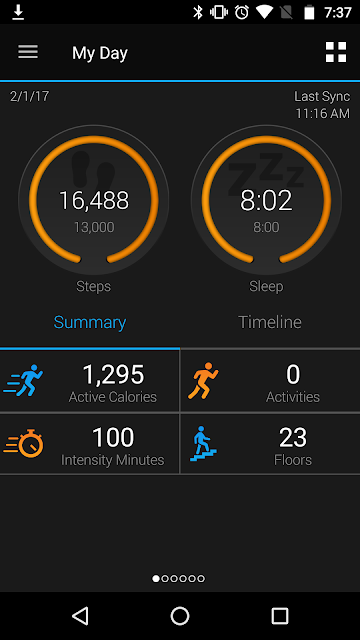
9. After 9 months with the Vivosmart HR, I can confirm that the sleep tracking doesnt work for me. Due to my irregular habits, sleep tracking may work for some owners of the Vivosmart HR. For my part, even if I specify my normal sleeping time using the Garmin Connect app, the Vivosmart HR thinks Im sleeping if I spend just a few minutes reading literature on my Kobo Glo, or a 70s Spider-Man comic book on my Sony Xperia C3. On occasion, Garmin Connect even loses time completely, even if I just visit the toilet once at 2 am.

The sleeping data the Garmin provides is always misleading. Users will have to be vigilant about editing collected sleep times if they seriously want to track their sleep.

In short, sleep data collected by the Vivosmart HR just isnt reliable and shouldnt be taken seriously. Add to the fact that the Garmin can be uncomfortable in bed, Ive stopped wearing it at night and power it down. 

On the plus side, the Vivosmart HR is all right tracking the 15 minute nap I occasionally indulge in.

Continued in 9 Months and counting with the Garmin Vivosmart HR Part 4

Search