Showing posts with label things. Show all posts

Tuesday, June 20, 2017

Posted by beni in , , , , , , , , , , | June 20, 2017

5G visionaries make a head start on the internet of things


Fibre optic lighting London
There will be 50 billion everyday objects connected to the internet by 2020 Photo: (c) John Rensten
With the 5G mobile network set to launch in 2020, the UK�s brightest minds are poised to drive innovation, championing new hardware and technologies that will transform the way we live.
By the time of 5G�s inception, it is estimated that there will be up to 100 billion internet-ready devices on the planet. So, while you�ll be glad to hear that internet speeds will dramatically increase, with the capability to download a movie in less than a second, this really is only the tip of the iceberg in terms of what it will enable.
Anyone who�s read a newspaper in the last six months will no doubt have come across the concept of �the internet of things�, this idea of machine-to-machine communication has the potential to completely overhaul the way we use technology. At present, the radio spectrum through which we communicate is extremely congested; 5G will increase the number of and broaden the available channels, allowing a larger number to operate simultaneously, with higher bandwidths, and with reliably lower-latency. And all of this with reduced power consumption.
This capability will allow large numbers of low-power inanimate objects equipped with sensors to �talk to� other internet-ready devices, reliably and without significant delay. For example, driverless cars will be brought to reality on a commercially useful scale, and will be able to receive driving instructions, and a steady stream of real-time data about traffic volumes and the movement of other vehicles. In this way, cars of the future will be able to calculate the safest, fastest route. These smart cars could also more effectively detect and report faults in the vehicle and, to save the owner time, book a service at the nearest garage and drive there independently.
One of the most exciting areas of application is healthcare. In effect, personal hardware devices which monitor information such as blood glucose and heart rate could transfer data about patients� vital signs remotely, passing it to a doctor and alerting them if an individual�s condition has worsened. This technology could help to increase the amount of out-patient care that can be delivered, thereby reducing the need for overnight hospital stays and freeing up beds. Furthermore, ambulances on the way to an emergency could access patient medical records and pull up real-time data on their current condition before arriving at the scene, allowing more immediately effective treatment.
Even though 5G has not yet been fully defined, the promise of a faster, more reliable network is mobilising engineers around the world. The combination of a lack of constraints and the promise of high monetary rewards available for those whose technologies take off, has acted as a catalyst in promoting further research and development. While there are opportunities for those developing hardware and the algorithms that will support the low power and reliability requirements of the internet of things, data security is another area which will need to be greatly advanced for the 5G network to thrive.
With more devices connected to the internet, and these devices collecting personal data such as medical information and location, security will be of central importance. Devices holding sensitive information are vulnerable to attack and it is likely that 5G capabilities will herald the creation of data vaults; Fort Knox-style storage facilities protected from cyber and physical attack.
It is vital that companies creating these new technologies obtain patents to protect their intellectual property at an early stage. Doing so will enable the sale and licensing of products which add functionality to, or are enabled by, the 5G network. Some businesses may choose to adopt a dual patent strategy, the first protecting their primary market which is not 5G related, and the second strategy protecting their more speculative innovation that could form part of the new 5G standard.
While the criteria for the standard is still unknown, the creation of the first truly global mobile network represents a huge opportunity for innovators. Taking action to create new technology now, and protecting that technology with patents could create new products and services for companies to sell, create jobs, and open up export markets. Whether or not all of these innovations are used by the 5G network, the current surge in research and development is going to be hugely beneficial for Britain�s technology industry.

Wednesday, June 14, 2017

Posted by beni in , , , , , , , , , | June 14, 2017

5 things to know about new IU coach Archie Miller


March Madness 360: Archie Miller hired as Indiana head coach

IndyStar IU Insider Zach Osterman discusses the Hoosiers" choice of Archie Miller as the program"s new men"s basketball coach. Matthew Glenesk / IndyStar

Archie Miller is the new head man in charge of IU"s basketball program.(Photo: Brian Spurlock-USA TODAY Sports)

Indiana University has hired Archie Miller as its men"s basketball coach. Here are five things to know about Miller:

1. Coaching family

Miller"s brother, Sean, is the coach at Arizona and both played for their father, John Miller, at Blackhawk High School in Beaver Falls, Pa. John Miller was 657-280 in a 35-year coaching career he retired in 2005 including 104-29 in the postseason. He won eight Western Pennsylvania Interscholastic Athletic League championships, the second most in history, and four Pennsylvania Interscholastic Athletic Association titles.

Car rides home after practice, driving from camp to camp, said Archie of his father in a 2014 TribLive.com article. He"s really teaching you how to be a coach, and you don"t even realize it. He knew what hard work was. He knew what dedication was. He knew what preparation was. He knew how to communicate. It starts to come naturally to you. It"s all you do. It"s all you"re around, and it"s all you talk about.

Archie and Sean are one offour Division I head coaching brother combinations, joining the Drews (Scott, Baylor, and Bryce, Vanderbilt), Hurleys (Bobby, Arizona State, and Dan, Rhode Island), and Joneses (Joe, Boston University, and James, Yale).Archie and Sean Miller are the first brothers to coach different teams in the Sweet 16 and Elite Eight in the same season (2014).

2. Disciplinarian

Dayton took strong disciplinary actions when players run afoul of the law under Miller.

Dayton dismissed junior forwards Devon Scott and Jalen Robinson in 2014. The decision was related to a series of thefts from residence halls on campus, according to the Dayton Daily News. The players were key figures in Dayton reaching the Elite Eight the previous season, but the Flyers went 25-8 without them.

Dayton suspended star Dyshawn Pierre for a semester during the 2015-16 season after a hearing board determined he violated the university"s policy on unwanted sexual contact, according to the Dayton Daily News. The decision was upheld by a federal judge, who ruled Pierre"s attorney failed to prove that Dayton"s process for determining Pierre"s guilt was biased or unfair. Prosecutors determined there was insufficient evidence to charge him with a crime but university policy had a lower standard of guilt. Pierre returned to the team at the end of his suspension.

MORE:Archie Miller "a great hire, great for the state"

DOYEL: Fred Glass knocks it out of the park with Archie Miller

MORE:Reaction to IU"s hiring of Archie Miller

3. No sibling rivalry

Sean and Archie are 10 years apart and Archie has said that led his brother to being more of a mentor than a rival.Sean, then an assistant, recruited Archie to North Carolina State as a point guard.Sean also hired Archie as an assistant at Arizona when we got the job in 2009. Archie was there for two seasons, helping with a 14-win turnaround, from 16-15 in 2009-10 to 30-8.

We didnt grow up in the house together two years apart and the backyard, Archie Miller told the Washington Post for a 2015 story. ... I basically look at him sort of as the role model, the guy whom to be like, the guy who to call when you need something, the one that helped you get to where you wanted to get to.

So its a much different relationship in that way. ...Hes a great reference. But no, were not that brotherly relationship thats like that. Were much different. Hes much more of a guy that I look for wisdom and knowledge from than anything else.

4. Meet Ryan Miller

Archie"s given name is Ryan but was called Archie at an early age because his personality was similar to Archie Bunker, thegrouchy TV character, according to the story on TribLive.com.

MORE:"No doubt" Archie Miller will make in-state recruiting a priority

I always felt that someone was looking at me and saying I"m not that good, not that big, he"s sean"s brother, miller told TribLive.com for a 2014 story.I felt that all the time growing up. I wasn"t as friendly. I didn"t go out of my way to make conversation. I always felt like I had a chip on my shoulder.

5. No leaks not a surprise

Much of the talk around the IU job had been focused on UCLA"s Steve Alford and Billy Donovan of the Oklahoma City Thunder. It shouldn"t be a surprise that Miller"s name didn"t surface until minutes before his hire was announced.

He kept his interview in Dayton a secret ... from his own father according to the Dayton Daily News.

My wife and I flew into Houston, and we were sitting there at a Starbucks in the airport about to head to the shuttle when I was like Holy Cow, theres Archie, John Miller said.He said hed take us to the hotel. On the way I said, Hey, what do you hear about the Dayton job? He said, I havent heard anything. I think thats a little above me maybe. He didnt give us a thing. I thought Dayton might be interested, but he didnt give us a clue. Then the next thing hes calling us and telling us hes flying up there to check out the job.

Source: http://www.courier-journal.com/story/sports/college/indiana/2017/03/25/5-things-know-new-iu-coach-archie-miller/99619454/

Sunday, June 4, 2017

Posted by beni in , , , , , , , , | June 04, 2017

5 Things to Avoid in the Current Stock Market


1. Avoid anchors
I hear a lot of people saying that the Sensex P/E at 18x is cheap as it is at the same level as the last few years� average P/E.
Basing your investment decisions on the Sensex P/E can be dangerous, as this is just an anchor that tells us how much people are willing to pay for the top 30 stocks on an average, not whether the stock you are eyeing is cheap or expensive.
Even when the Sensex P/E stands at 18x now, a lot of stocks are trading at 50-60x and a lot at 5-6x, so ignore this number. Also, looking at average Sensex P/E is illogical as the average is artificially higher owing to the bubble of 2007-08.
You must also not give much weight to a stock�s P/E in basing your investment decision. It�s more important to look at the underlying business and whether it is great, good, or gruesome as per Buffett�s standards.
Another anchor to avoid is the stock price itself, especially given that prices have moved sharply in the past 2-3 months.
Remember that a stock does not become a buy/sell just because it has fallen/risen from a certain price.
2. Avoid arrogance
I see a lot of my trader and investor friends feeling a lot better after the gains they�ve made over the past three months.

They are confusing luck and bull market with brains and skill�and would do well to remember that a good performance in the short term has serious limitations as a basis for estimating long term results.
If you are sailing in the same boat, you would do well to remember Charlie Munger�s advice to maintain intellectual humility amidst heady gains�
  • Stay within a well-defined circle of competence
  • Identify and reconcile disconfirming evidence
  • Resist the craving for false precision, false certainties, etc.
  • Above all, never fool yourself, and remember that you are the easiest person to fool
  • �Understanding both the power of compound interest and the difficulty of getting it is the heart and soul of understanding a lot of things.�
What is more, despite all excitement about Sensex @ 21,000, it�s important to understand that this market is sitting on a much fragile base than when Sensex touched 21,000 in January 2008.
This is thanks to an overdose of cheap money that has inflated bubbles around the world, and especially in emerging market stocks.
When these bubbles will burst is anybody�s guess, but you may call the US Federal Reserve for clarifications, or CNBC office for their predictions.
3. Avoid �cheap� stocks
India has many more zombie companies � sitting on high debt without much cash to survive and without much new business coming in � today than in 2008. So the probability of romancing a value trap is high.

Thus, be very-very careful while buying �cheap� stuff, like stocks at 52-week lows.
Things sometimes get cheap for valid reasons�and cheap often gets cheaper.
So avoid the obviously bad businesses, even if they look cheap.
If you need some hints of what kind of businesses to avoid and what would happen if you don�t avoid them, look at this chart�

Remember what Buffett said � �Time is the friend of the wonderful business, the enemy of the mediocre.�
Avoid the mediocre businesses even if they are available cheap (like at <5x font="" p="">
Such businesses are not just terrible investments for you, but also a major distraction that would cost you in terms of opportunity cost.
4. Avoid multi-bagger ideas
I hear that a lot of stock brokers are shutting shop for the lack of business. In fact, as per the SEBI, around 500 brokers have officially shut shop since April 2013. They say �investors are not investing� while they must say �traders are not trading�.

Anyways, helped by this �Sensex @ 21,000� bait, a lot of brokers and stocks tippers are calling me to sell their trading or research services. One is in fact guaranteeing (not on paper) to earn me Rs 1,000 per day in profit!
If you are also receiving such calls or emails where you are promised multi-bagger returns, simply say �thank you� and turn them away.
They may have their targets to meet so don�t scold them. Just say a polite �no�.
5. Avoid predictions
Given that the stock market (read, Sensex) has gone nowhere over the past five years, some �sane� minds are pronouncing long term equity investing as dead (again!).

Then there are many who have raised their Sensex targets to 22,000 or 23,000.
Avoid any such predictions. They are just baits to invite you to part away with your money.

Wednesday, May 24, 2017

Posted by beni in , , , , , , | May 24, 2017

5 Things To Do After Installing Jaunty


Powered by Ubuntu Linux (Sticker)

Enjoying the latest and greatest that Linux has to offer? Here are 5 things you should do to get even more from your Ubuntu 9.04

1) Configure Firewall

If you are concern about your security, then it is pertinent that you activate the firewall and prevent any unauthorized access to your computer.

UFW is installed by default, but if you need a graphical interface, install GUFW.
sudo apt-get install gufw

2) Enable the repositories

Every time I do a fresh install of Ubuntu, the first thing that I do is to enable the universe, multiverse, backport and Canonical�s �partner� repositories. These repositories open up new application choices and allow you to install popular third party software easily and quickly.

Go to System -> Administration -> Synaptic Package Manager.

Click on Settings -> Repositories.

Check all the boxes.

Go to the Third-Party Software tab. Check all the boxes.

Click on Close button and press the Reload button at the top left corner to update the repositories.

3) Wine

Wine is a must-have application for those who can�t live without their Windows applications, It allows you to install your Windows application in your Ubuntu machine and run them like native Windows apps.
sudo apt-get install wine

Once you have installed Wine, remember to run the configuration (Applications -> Wine -> Configure Wine) before attempting to install your favorite Windows app.

4) Ubuntu-Restricted-extras

YouTube, LLCCan�t listen to MP3? Can�t watch Youtube video? Can�t run Java? Don�t worry, all you need to do is to install the ubuntu-restricted-extras package and it will install all the necessary files/codecs for you. Some common applications in the package include MP3 codec, Adobe Flash player, Java runtime and Microsoft core fonts.
sudo apt-get install ubuntu-restricted-extras

5) Download Ubuntu Tweak and VLC

Download Ubuntu Tweak here and install it by double clicking the .deb file

Download VLC by this command

sudo apt-get install vlc

Posted by beni in , , , , , , , , , , | May 24, 2017

A few things on Pythons Error Handling syntax and their usages


As a noob in programming, I encountered code error very often. In fact, I am so used to it that I truly expect some error in every snippet of my code. When I dont encounter on, I feel genuinely insecure about it...

However, with the more experience I have now, I meet fewer errors in my scripts, and when I started building web application that requires user input, I need to worry more about mistake made by the user instead of myself.

That was the moment that I realize the power of Pythons error handling - yep, back when I was just learning Python, these stuff meant nothing to me, well, more or less, they are just meaningless.

The biggest problem with programs that take user input is, in most programming languages, when an error occur, the script will stop executing.

This makes a lot of sense in logic, but it is most certainly a very bad experience to the users.

Error handling will help us prevent such embarrassment - to us, as well as the users.

While take input from user, be it using raw_input or a form submitted over HTTP POST, we should not encountered much problem. It means that taking input is quite safe actually.

What is NOT safe is when we try to do something with the user input, which, is always the case - after all, if you are not doing anything about the input data, what is the point of collecting in the first place, right?

This is where things become dangerous - lets say you have a field that accept user to enter their birthday, without checking and converting the data in the front end, there are just countless ways an user may enter its birthday.

Consider these few possible date format: "28th September, 2014" , "28-09-2014", "28/09/2014", "28-9-2014".

While these date formats all make sense, but it would be really hard for us to handle such input, converting them into a format that our database use.

Alright, enough with the back story and logic behind using Error Handling, lets talk about the syntax and how we can actually use them.

There are mainly 4 keywords used in Python to handle errors.

They are "try", "except", "else" and "finally"

Just like any other Python syntax, their meaning and usage are actually quite straightforward.

First, we would need a try block in our code, say we are now going to handle the input data from the birthday field, and we want to try converting it into integer for processing.

However, we do not know if the user would be using a format with only number, therefore, we are not sure if the int( ) conversion function will work.

So, we write something like this:

try:
     data = int(birthday_input_data)

Just like we would normally operate on a safe string.

But yes, we are expecting error, because the user may use a format that contains ASCII characters.

If we try to use the int() function on a string with ASCII letters, Python would raise an error like this:
 
Traceback (most recent call last):
  File "<stdin>", line 1, in <module>
ValueError: invalid literal for int() with base 10: foobar

As we can see in the last line of the error message, the resulting error is called "ValueError" in python, which is the Error Type we aimed to solve with our next block, so we are going to write it like this:

except ValueError:
      #do something with a data input with ASCII string


Alternatively, if we are not sure what else Error could be cause ahead of time, we can prepare a fallback general-purpose exception case like this:

except:  #with no ValueError class
     #report to the user that a fatal error is caused and the script cannot proceed with the input
     #nicely ask them to try again.


Of course, just like an IF block, we can add multiple layers in the try block to try to handle different possible cases before handing it to the fallback exception.

But what we the code worked the first time? With no error?

In this case, we can add an ELSE block after the TRY block. Like so:

else: #no error
     data.insert_to_database()


Lastly, we do also set a default action to an error handling block at the end to safely close files or re-collect resources. This is done by using the "FINALLY" block at the end, which will always get executed whether there are errors or not.

In our example, we might want to do something like this:

finally:
    db_connection.end()
    #or
    document.close()
 
Thats it.

Again, I wrote these stuff not trying to be a guru, but simply because I am that kind of person who always want to know the rationale behind something before I can fully understand a concept.

The benefit of writing error handling code took sometime to dig into my stubborn head, I hope this article could help someone like me, struggling to understand the purpose of some code.

Tuesday, May 23, 2017

Posted by beni in , , , , , , | May 23, 2017

5 Things Do After installing Linux Mint


1. Software Update 
    select the update manager from
       Menu  >> Administration >> Update Manager

you can also do it with terminal  sudo apt-get update && sudo apt-get upgrade  

2.
Change the search engines of Firefox
To change the search engine in the search box of Firefox to Google, you just need to open Firefox then go to the following address:
 http://www.linuxmint.com/searchengine_google.php 


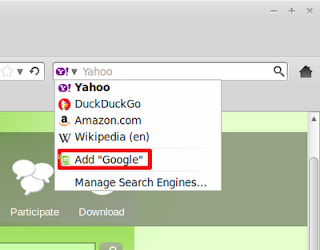
After that, click on the drop down list in the search box and select "Add Google"


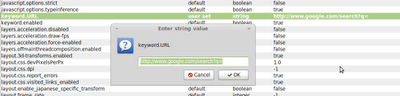
To change the search engine of the address bar from DuckDuckGo to Google, you open Firefox , type about:config on the address bar. You will see a warning, just click on the "Ill be careful" button to go to the config page. In this config page, scroll down until you find the line that begins with "keyword.URL":


Right click on this line and select the Modify option. The box to edit the search engine will appear, in this box, you just need to replace the DuckDuckGo url with Google:
 http://www.google.com/search?q= 

Click ok .  Now both the address bar and the search box use Google as the default search engine.
3. Install new Themes and Icons 
 The best place to look for nice themes and icons in my opinion is Gnome-look . And get the themes and icons . Also remember to read the installation instruction of each theme and icon set.
 a conky setup
 
Install Conky in Ubuntu/Linux Mint open terminal (Press Ctrl+Alt+T) and copy the following commands in the Terminal:                 
 sudo apt-get install conky conky-all
If gadget doesnt adjust in your screen, you can change size in line 40, 41. Enter Following command to open file in text editor and change size:
                               sudo gedit ~/.conkyrc
5.Install Compiz Config Settings Manager
Compiz is an awesome tool, you can do a lot of cool things with it so I recommend everybody to install Compiz. You can tweak a lot of things with CCSM and of course, it is always fun to show the cubic desktops to your friends :D
To install Compiz, you can search for it in the Software Manager or run the following command:
 sudo apt-get install compizconfig-settings-manager 

6.Install Wine
I myself at times need to run some Windows applications so Wine is always a must-have tool for me. To install Wine, you can search for it in the Software Manager or use this command:
 sudo apt-get install wine 


Monday, May 22, 2017

Posted by beni in , , , , , , , , , , , , , | May 22, 2017

A Few Things This Week In Gaming Saturday July 11th 2015 Some Gaming News Bits


Ive had a lot happen this week [including going to the Hospital!] and havent been able to finish any of the many posts I am working on at the moment, but I wanted to quickly mention a couple little tidbits of Gaming that have either happened this Week or is going on this very Weekend...


  • Trove is out of Beta and was fully Released just two days ago! I was in the Closed Beta after buying a starter/support pack of in-game Credits and was enjoying the Open Beta off and on. Similar to games like Cubeworld, Minecraft or Lego Worlds, its a fun little game with a large, explorable MMO world that has Monsters and Crafting and Building to do everywhere, with RPG elements (levelling up a character, classes to choose from with various abilities, etc). I am working on a First Impressions And Screenshots article for it [that I started in the Beta] and hope to get that done Soon�. Try it out at: http://www.trionworlds.com/trove/2015/07/09/trove-launch-the-adventure-begins/


  • Marvel Heroes is having a major giveaway [which is more of a Sweepstakes, in my opinion, since its not a simple here, you have to hunt for it] where playing the game and finding Drops has a chance of winning you $5000 (there are only five prizes available). Check it out at: https://marvelheroes.com/news/news-articles/marvel-heroes-2015-25000-giveaway


  • For those that played Battlefield Play4Free, just a reminder that this coming Tuesday is the Last Ever day for BFP4F. Ive given away a couple of Play4Free Funds codes here at The Blog [that EA had given out] and also noticed that EA has lowered the Deal Again price for The Daily Draw way down to 99 Funds - super cheap, if youre sitting on leftover Funds in that game. Get over there and get some new gear while you can at: http://battlefield.play4free.com/


  • And of course, some Deals and Sales are going on at various companies/websites this Weekend. I sometimes post when some Sales are going on, but not all the time - and this weekend I can see Steam has some Deals going on and Good Old Games [now GOG.com] has a nice Weekend Deal that includes Series of many games, like Tomb Raider, Deus Ex, Thief and Hitman - ooh, I might pick up Urban Chaos for a buck-ninety-nine... See if you find anything you want here: http://www.gog.com/promo/weekend_promo_square_enix_100715


  • Oh, Ive uploaded a couple more videos at The Game Tips And More Blogs Plays.Tv page, including "Part 2" of a Minecraft Playthrough I call "To The End", where I play up to The End area/stage in Minecraft, but not further - I dont want to spoil the ending [as much as it is an ending] for the game, but Ill play and record completely up to that point - creating a New World every version/update [something I started back in Beta, but lost most of the past videos for, unfortunately]. There are also some Battlefield: Hardline clips (a Tutorial and Living The Dream), Hitman Series clips (some Glitches and Speedruns), a couple of Trove vids (with a short Tutorial one) and more. Check it out sometime, at: http://plays.tv/u/GameTipsAndMore


These are just a few things that are going on... but thats it for me, for now - See You In The Games!


Wednesday, May 17, 2017

Posted by beni in , , , , , , , | May 17, 2017

A few things that made my 2015 interesting


The beautiful view from the Mayan Palace, Mexico
2015 was a wonderful and probably the best-so-far year for me. This year had traces of a few previous years, remarkably 2013.

Abiding to my tradition of writing an annual summarizing post, I am listing below a few things that made my 2015 interesting. The list is in a random order, and the order does not represent anything.

1. Data Quality (QD) module. 

ok, I never thought I will start this list with a course I did at the university. But there are multiple reasons.

2. A leisurely sun set walk in Puerto Pe�asco, Mexico. 

3. Graduating. Twice!

This year, I graduated from my masters double degree, from IST Lisboa and KTH Stockholm, and attended two graduation ceremonies (in Portugal and Sweden) to receive the degree award.

4. My comeback to FOSS.

It was always in my new year resolutions in the recent years. This year I got active with OpenDaylight community, leading the Messaging4Transport Project, and also created an OpenDaylight user group in Lisboa.

5. The HOT Summer! More beaches, across continents - in Portugal, Spain, Mexico, Sri Lanka, Maldives, Sweden, Italy, and Croatia. Portim�o beach in Portugal was unexpectedly pleasant.

6. Floating in the water with fish, in the clean water beach of an uninhabited island of Maldives.

7. Chocolate wine! Who dislikes them?

8. OpenDaylight Summit in Santa Clara. I never thought I will have this much of information from a single conference. This was my second time to SJC, and first time to encounter a delayed flight and changing the flights to avoid missing the connecting flight.

9. God Ganesh Temple and getting soaked in the rainy night in Colombo.

10. Cooking for my parents in Sri Lanka.

I have cooked for friends many times before. But first time for my mom and dad. That was truly remarkable. I missed this during my 2013 visit (and I was not capable of cooking before 2013. :) )

11. A long walk in a burning day in Belgrade. Till that point, I was under the impression that nothing can burn me.

12. Ljubljana. I was impressed by the river side wifi and game meat. :)

13. A number of travels, higher than the last three years combined!

14. Backpacking to Andorra. Never thought I would be able to go light weight. An achievement of the year for sure. 

15. A helicopter ride in a pleasant winter day.

16. More presentations! First time I presented my work in another university as a guest speaker.

My presentation at ASU, in Tempe for IC2E 2015 was remarkable. Loved that conference, and active involvement and enthusiasm from the participants during many of the presentations.

17. A late summer vacation in Sri Lanka. Not really a vacation. I was getting married. ^_^

Also experienced being a tourist in Colombo. Never felt like a tourist in my own country before.

18. My first short-term scientific mission (STSM) at the University of Rijeka, Croatia. Sounds fancy, isnt it? :)

This also includes working with my computer with the noise of frogs, while sitting outside the University of Rijeka in the stair case, in the mid night! They just close the faculty by 10 pm, and I did not have internet connection in my big and beautiful apartment (that was supposed to be a professors apartment. The topmost floor of the students dormitory. Loved it).

All the COST actions of the same program are listed here, including mine.

19. Long flights. This year I had many long flights.

I enjoy watching movies in the long flights, because they have English subtitles for foreign language movies. Sometimes I just fall asleep in the flight while attempting to watch a movie. :D

This year, for the first time, I got my luggage delayed (by a day, and it was in PHX). Another first - this year, when I reached SJC after completing a trip, I was informed that there is a flight delay that might lead me missing my connecting flight in LAX. Hence, I was given a free shuttle ride to SFO and sent to LIS in an alternative route. :)

20. Stockholm, once again! It was loads of loads of loads of memories! I actually went to Stockholm twice this year. But somehow missed Kista during both trips.

21. Kayaking once more from Fejan! Never did I guess in 2013 that I would visit this place for another EMDC Summer Event.

22. An unhealthy lunch at Trst, Italy. All while keeping an eye at the hungry, persistent, and bullying seagulls.

23. Planning for the events in 2016 starting from early December!

Already have 3 confirmed events in my list in Berlin, Portland, and San Francisco.In addition, have a planned trip to Shenzhen, and planning another long term journey to Atlanta. Many of these events are outcomes of the collaboration with Emory BMI. It was a pleasant surprise that we got many papers as outcomes, which I am in fact going to present in 2016. We have 4 accepted papers; 3 to be presented - MediCurator, Data Cafe, and SPREAD, and MEDIator already presented.

24. Barcelona once more. This was my first EMJD-DC Spring Event. Nice to meet all the colleagues for the first. We are so distributed - In Portugal, Spain, Belgium, and Sweden.

25. Renting an own apartment. No more apartment sharing, at least as long as we are in Portugal. More privacy.. ^_^

26. Random walking in many new cities alone. Often with a map. Often without; asking strangers for information. It felt like a virtual reality game, finding random places with no knowledge of the local language.  May be an increased level of confidence? Well, to be fair, many of the youngsters I met in these cities speak better English than me.

27. Some successes (xSDN, ?u?u, Cassowary, MEDIator, Data Cafe, MediCurator, SPREAD, ..) and some failures (SDCO, S�DN, RAVANA, SMART, FIRM, ..), and... some mixtures (SENDIM, ..). I am talking about my projects, if you are confused.

28. Spring flowers in Frankfurt, Germany.

29. International border crossings by land, and long bus rides. 

This includes US <-> Mexico, Croatia <-> Slovenia, and Croatia <-> Serbia. Never really did this before this year (not counting Sweden <-> Denmark (2013) and Spain <-> Andorra (2015) as real borders due to the Schengen open visa policy).

30. Multiple plots and locations. Spent most of the time in Portugal, with one month each in Croatia and Sri Lanka, in the mid-year.

Other short-term locations include US (twice), Mexico, Germany, Sweden (twice), Spain, Andorra, Italy, Slovenia, Serbia, and Maldives. This made 2015 a year full of travels for me.

Thanks for reading my list till the end. If you are really interested, you may also read the blog posts on the previous years (2015 - 2012) as well.

Thursday, May 4, 2017

Posted by beni in , , , , , , , , , , | May 04, 2017

8 Things To Do After Installing Ubuntu 13 10 Saucy Salamander


Posted: 17 Oct 2013 11:13 AM PDT
Ubuntu 13.10 was released today and for those of you who plan on doing a clean install, here are 8 useful things to do after the installation.

Ubuntu 13.10 Saucy Salamander


1. Install some extra AppIndicators (applets)


System Load Indicator Ubuntu

System Load Indicator is a port of the popular System Monitor GNOME Panel applet and it can display CPU, memory, network usage, hard disk I/O and more on the panel. Install it from the Ubuntu Software Center by clicking the button below:

Download for Ubuntu

Or, to install it via command line, use:
sudo apt-get install indicator-multiload


CPUFreq Indicator

Cpufreq Indicator is the equivalent of the old GNOME CPU frequency scaling applet which can be used for changing the CPU frequency on-the-fly. Install it in Ubuntu by clicking the button below:

Download for Ubuntu

Or install it from the command line:
sudo apt-get install indicator-cpufreq


My Weather Indicator is an appindicator that displays the current weather on the Unity panel. The appindicator can also display a 5-day forecast, a desktop widget and supports four weather services: OpenWeatherMap, Yahoo, Wunderground and World Weather Online.

To install it in Ubuntu 13.10, use the commands below:
sudo add-apt-repository ppa:atareao/atareao
sudo apt-get update
sudo apt-get install my-weather-indicator


Variety wallpaper changer

Variety is an application that comes with an AppIndicator but since you basically only have to configure it once and after that youll only need to use the AppIndicator, Ill list it here. Variety is a cool wallpaper changer that automatically downloads and changes your wallpaper on a given interval. Using it, youll get cool, fresh wallpapers each day. From the AppIndicator you can quickly switch to the next (random) wallpaper or copy the wallpaper to favourites, for later use.

To install Variety in Ubuntu, use the following commands:
sudo add-apt-repository ppa:peterlevi/ppa
sudo apt-get update
sudo apt-get install variety


Diodon clipboard manager appindicator

Youll probably also want a clipboard manager. I recommend Diodon which is lightweight, supports files, image sections and more. To install it in Ubuntu 13.10 Saucy Salamander, click the button below:

Download for Ubuntu

Or open a terminal and copy/paste the following command to install it:
sudo apt-get install diodon diodon-plugins

More AppIndicators on WebUpd8 and on AskUbuntu.


2. Tweak Unity


Unity Tweak Tool

Unity Tweak Tool allows users to change various Unity settings such as auto-hide bahavior, window snapping and hot corners, tweak Dash, the Unity Launcher or HUD, change the GTK or icon theme, change the font face or size, move the window controls to the right and much more.

To install Unity Tweak Tool from the Ubuntu Software Center, click the button below:

Download for Ubuntu

Or, install it in Ubuntu 13.10 via command line:
sudo apt-get install unity-tweak-tool


3. Privacy tweaks


Ubuntu 13.10 privacy

As you probably know, by default Dash shows all the recently accessed files as well as other files found on your filesystem. By selecting Security & Privacy from System Settings, you can choose what file types can show up in Dash, exclude various applications or folders/partitions from showing up in Dash and theres also an option to clear usage data.

Furthermore, on the Search tab, you can disable online search results from being displayed in Dash. However, this option disables all the online search results so if for instance you only want to disable the shopping suggestions, you can run the following command:
gsettings set com.canonical.Unity.Lenses disabled-scopes "[more_suggestions-amazon.scope, more_suggestions-u1ms.scope, more_suggestions-populartracks.scope, music-musicstore.scope, more_suggestions-ebay.scope, more_suggestions-ubuntushop.scope, more_suggestions-skimlinks.scope]"

More on disabling Dash (search) plugins, HERE.


Privacy indicator

Another way to deal with privacy in Ubuntu 13.10 is to use the Privacy Indicator, a tool hat lets you quickly enable/disable Zeitgeist (activity logging) or online search results from showing up in Dash, clear the Zeitgeist log or recent files (which show up in the Nautilus "Recent" sidebar item for instance).

Download Privacy Indicator (theres a deb available at the bottom of the page)


4. Enable the discrete card on systems with Hybrid graphics


The Ubuntu developers have worked to support Hybrid graphics in Ubuntu 13.10 (and 12.04 LTS). Below youll find instructions on how to set this up.

Nvidia settings Ubuntu

Nvidia Optimus: unfortunately, the Nvidia Linux graphics drivers dont yet fully support Optimus - more on this subject, HERE.

Ubuntu 13.10 (Saucy Salamander) ships with a new package called "nvidia-prime" which enables the Nvidia graphics card on Optimus systems (which by default use the integrated Intel graphics chip). By using the instructions below, the Nvidia card will always be in use, so theres no way to switch it off to save power. Because of this, the laptop will consume more power and possibly overheat - in my case, the laptop gets really hot and for this reason Im not using this solution but things may work better for your laptop (and if not, you can easily revert the changes).

Unfortunately, thats not the only issue. You may also experience screen tearing and hotplug wont work so if you want to use multiple monitors, youll have to manually set them up in xorg.conf. The advantages are that youll be able to play games that arent supported by the Intel graphics, use VDPAU-enabled media players, etc.

That said, if you want to give this a try in Ubuntu 13.10 Saucy Salamander, make sure youre using LightDM (the default Ubuntu display manager) and not some other display manager like GDM. Also, if youve installed Bumblebee, youll need to purge it:
sudo apt-get purge bumblebee* bbswitch-dkms

Then, install the latest Nvidia drivers and "nvidia-prime":
sudo apt-get install nvidia-319 nvidia-settings-319 nvidia-prime

And finally, reboot (restarting X isnt enough).

If you want to revert this change, simply remove the installed packages:
sudo apt-get remove nvidia-319 nvidia-settings-319 nvidia-prime
And reboot.

AMD Hybrid graphics: I didnt test this because I dont have a system with AMD graphics, but according to the HybridGraphics Ubuntu wiki page, there arent any known issues, so I assume that everything works properly (again, Im not sure since I cant test it!).

To get proper AMD Hybrid graphics support in Ubuntu 13.10, all you have to do is install the latest fglrx driver and fglrx-pxpress from the repositories:
sudo apt-get install fglrx fglrx-pxpress
And then reboot the system (restarting X isnt enough).


5. Improve battery life


There are two tools you can use to improve your laptops battery life: laptop-mode-tools or TLP. Both try to achieve the same thing, but from what Ive read, TLP seems to save a bit more power. However, TLP is only available in a PPA so if you dont like adding PPAs, install laptop-mode-tools.

Important note: dont install both laptop-mode-tools and TLP!

To install laptop-mode-tools, click the button below:

Download for Ubuntu

Or install it from the command line:
sudo apt-get install laptop-mode-tools

Or, to install TLP, use the commands below:
sudo add-apt-repository ppa:linrunner/tlp
sudo apt-get update
sudo apt-get install tlp tlp-rdw
sudo tlp start

No configuration is needed for either TLP or laptop-mode-tools.

Another way to save power and prevent your laptop from overheating (the tool also allows running apps or games on the discrete graphics card on demand, using the "optirun" command - see below) is Bumblebee. Bumblebee is a tool for laptops that use Nvidia Optimus, that disables the Nvidia card when not in use.

Note: if you plan on using the hybrid graphics solution under step 4 for Nvidia Optimus, dont install Bumblebee!

To install Bumblebee, click the button below:

Download for Ubuntu

Or install it via command line:
sudo apt-get install bumblebee bumblebee-nvidia

Then reboot.

Currently theres a bug in Ubuntu 13.10 that prevents "optirun" from working. To fix it, use the following command:

- 32bit:
sudo ln -s /usr/lib/i386-linux-gnu/libturbojpeg.so.0 /usr/lib/i386-linux-gnu/libturbojpeg.so
- 64bit:
sudo ln -s /usr/lib/x86_64-linux-gnu/libturbojpeg.so.0 /usr/lib/x86_64-linux-gnu/libturbojpeg.so

When you want to use the Nvidia graphics card for an application, run:
optirun APP-EXECUTABLE
replacing "APP-EXECUTABLE" with the application (or game) executable.


6. Install codecs, Java and encrypted DVD playback


To be able to play most audio and video formats, install Ubuntu Restricted Extras by clicking the button below:

Download for Ubuntu

Or install it using the following command:

sudo apt-get install ubuntu-restricted-extras


I suggest to also install the unrestricted versions of libavformat and libavcodec so you dont encounter issues with missing codecs when trying to use some video editors or transcoders - install them by clicking the button below:

Download for Ubuntu

Or by using the following command:

sudo apt-get install libavformat-extra-53 libavcodec-extra-53


You may also need Java, but you must figure out what you need. Most users will only need OpenJRE and the Java browser plugin which you can install by clicking the button below:

Download for Ubuntu

Or by using the following command:

sudo apt-get install icedtea-7-plugin openjdk-7-jre


For development, youll also want OpenJDK which you can install by using the button below:

Download for Ubuntu

Or by using the following command:

sudo apt-get install openjdk-7-jdk


If for various reasons, you need Oracle Java (the package includes JDK, JRE and the browser plugin), you can install Oracle Java 7 by using the following commands:
sudo add-apt-repository ppa:webupd8team/java
sudo apt-get update
sudo apt-get install oracle-java7-installer

Encrypted DVD playback: the Medibuntu repository no longer exists and while most packages in the archive are obsolete or unnecessary because most are now in the official Ubuntu repository or have better equivalents, livdvdcss is still required for playing encrypted DVDs. 

You can enable encrypted DVD playback in Ubuntu 13.10 by using the following commands:
sudo apt-get install libdvdread4
sudo /usr/share/doc/libdvdread4/install-css.sh


7. Get the latest Rhythmbox and VLC


Rhythmbox VLC

Two popular applications: Rhythmbox and VLC, havent been updated to the latest version in Ubuntu 13.10. If you want to install the latest version for these apps, you can use PPAs.

Please note that by upgrading Rhythmbox, the plugins in the Rhythmbox third-party plugins PPA will stop working. The plugins Rhythmbox ships with will obviously work.

Rhythmbox (version in Ubuntu 13.10: 2.99.1, version in PPA: 3.0.1):
sudo add-apt-repository ppa:jacob/media
sudo apt-get update
sudo apt-get install rhythmbox

VLC (version in Ubuntu 13.10: 2.0.8, version in the PPA: 2.1.0):
sudo add-apt-repository ppa:videolan/stable-daily
sudo apt-get update
sudo apt-get install vlc


8. Tweak Nautilus: disable recursive search and install a quick file previewer


Nautilus 3.8 no recursive

The type-ahead find feature was remove from Nautilus starting with version 3.6. Later versions perform a search in the current directory and all its subdirectories when you start typing a file name. And this makes it unusable at times so if you find this behavior annoying, you can install Nautilus patched to allow disabling recursive search (you can easily enable it back if you want).

To upgrade Nautilus to the patched version that allows disabling recursive search, use the following commands:
sudo add-apt-repository ppa:dr3mro/personal
sudo apt-get update
sudo apt-get upgrade
nautilus -q

Then, disable recursive search using the following command:
gsettings set org.gnome.nautilus.preferences enable-recursive-search false

If later on you want to re-enable recursive search, use the command below:
gsettings set org.gnome.nautilus.preferences enable-recursive-search true


GNOME Sushi

GNOME Sushi is a quick file previewer for Nautilus. To install it, click the button below (this will install gnome-sushi and unoconv, required to be able to preview some files such as documents):

Download for Ubuntu

or install it via command line:
sudo apt-get install gnome-sushi unoconv

To use it, select a file (picture, text or document, sound file and so on) and press the SPACE key to preview that file. You can close the preview either by clicking the SPACE key again or clicking the window close button.


Now its your turn. What are the first things you install or tweak after a fresh Ubuntu installation?

Originally published at WebUpd8: Daily Ubuntu / Linux news and application reviews.

Saturday, April 29, 2017

Posted by beni in , , , , , , , , , , , , , | April 29, 2017

5 Things to consider when buying a computer Mambo 5 Muhimu kabla ya kununua komyuta


Huu ni mfululizo wa mambo chungu nzima ambayo utakutana nayo unapotaka kununua kompyuta mpya.
Kununua kompyuta si jambo rahisi. Kuna aina nyingi mno za kompyuta. Unapaswa kwa kweli kununua kompyuta ambayo ni sahihi kwako ili usije kujuta baadaye.
Kwamba baada ya mwaka mmoja tu unajikuta haitoshelezi tena mahitaji yako.
Si kila kompyuta inatengenezwa sawa
Kompyuta hazitengenezwi kwa usawa. Na pia mahitaji ya mtu hayawezi kufanana na ya mwingine. Kwa hivyo manunuzi ya PC mpya yanategemeana na mahitaji yako.
Kama unataka kompyuta yenye uwezo mkubwa, itakubidi kulipa fedha nyingi zaidi. Katika muongozo huu, nitakuonesha ni kwa jinsi gani viungo vilivyo ndani ya kompyuta vina maana gani kwako.
Hii itakusaidia kuamua unahitaji nini na ni mambo yapi uyazingati zaidi.
Ni kwa jinsi hii ndiyo utaweza kuwa katika nafasi nzuri ya kununua kompyuta inayokufaa na inayoendana na mahitaji yako. Utakuwa katika nafasi ya kuepuka kutumia fedha nyingi pasipo sababu.
Unataka Kompyuta Mpakato (Laptop) au ya Mezani (Desktop)?
Pengine huu ni uamuzi rahisi kwako.
Lakini pia ni uamuzi ambao utapelekea kuamua ni kiasi gani utatumia kununua kompyuta yako. Kwa sababu kama Laptop na Desktop zina uwezo unaolingana, laptop itakuwa aghali zaidi ya desktop.
Kwa nini?
Kwa sababu laptop ina sifa za ziada ambazo desktop haina. Laptop inaweza kubebwa mahali popote kwa sababu ina umbo dogo kuliko desktop. Laptop ni nyepesi zaidi ya desktop. Laptop ina betri ambayo inaiwezesha kutumika hata mahali pasipo na umeme.


Desktop                                                           Laptop                                                          
Kwa hivyo kama unataka kompyuta ambayo itatumika zaidi mahali pamoja bila haja ya kubebeka, nunua desktop. Desktop pia ina faida ya kwamba una uwezo wa kuitunza kwa uda mrefu zaidi ya laptop. kwa sababu ina nafas kubwa ya kupoza joto na hivyo kuwa na maisha marefu.
Pia ni rahisi kubadili au kuongeza vifaa katika desktop kuliko katika laptop. hii inakupa mwanya wa kuboresha kompyuta yako kutokana na mahitaji ya wakati husika hata kama umepita muda mrefu.
Kwa hivyo kama unahitaji kusafiri mara kwa mara, chagua laptop. Kumbuka pia kwamba kama mahitaji yako ni mambo madogo madogo kama vile kutuma na kupokea email au kutafuta taarifa mtandaoni, unaweza kununua kifaa cha mkononi (tablet) au hata laptop ndogo zaidi.
Lengo lako ni kusave fedha ambazo zitatumika katika shughuli nyingine.
Hasa katika kipindi hiki cha utumbuaji majipu.
Fahamu ubongo wa kompyuta unayotaka kununua
Ubongo?
Yeah.
Ubongo wa Kompyuta � CPU
Kompyuta ina ubongo ambao huendesha kila kitu, kama vile ubongo wako unavyokusimamia wewe. Ubongo wa kompyuta unaitwa processor, au central processing unit � CPU.
Kama unataka kompyuta yenye kasi, inayowashwa na kuwa tayari kwa haraka, na inayokamilisha kile unachoiambia kwa haraka, bila kuchelewa, basi nunua ile yenye CPU bora zaidi.
Utajuaje?
CPU hupimwa kwa kiwango cha Gigahertz � GHz. Kompyuta nyingi za siku hizi huwa zimebandikwa nembo inayoonesha uwezo wa CPU. Kadiri uwezo wa CPU unavyokuwa mkubwa ndiyo kiwango cha kuchakata taarifa kwa haraka kinavyoongezeka.


Picha hii utaiona ikiwa imebandikwa pembeni au ubavuni mwa kompyuta. Kompyuta nyingi siku hizi utaona zimebandikwa nembo zinazosema core i3, core i5, au core i7.
Core i7 maana yake CPU ina uwezo mkubwa zaidi kuliko core i5 na core i3. Hata hivyo kitaalam, kompyuta zenye core i3 zinatoa kelele hafifu kuliko zile zenye core i5 na core i7.
Uwezo wa nafasi ya kufanyia kazi (RAM)
Kiwango cha uwezo wa kuhifadhi taarifa na data wakati kompyuta ikifanya kazi kinaitwa RAM � Random access memory.
Ni kama vile tulinganishe chumba kidogo ambacho wanaishi watu 10 na uwanja wa mpira ambako watu 60,000 wanaweza kuenea kwa wakati mmoja.
Kadiri kompyuta inavyokuwa na RAM kubwa ndivyo inavyoongezeka uwezo wa kufanya kazi kwa ufanisi zaidi. Watu kumi watakaa kwa kujibana chumbani lakini ukiwachukua na kuwaweka katika uwanja, watajitanua watakavyo.

RAM ya Kompyuta
Nunua kompyuta yenye RAM kubwa zaidi. Kompyuta nyingi za kisasa zina RAM yenye Gigabyte 4 (4 GB) na kuendelea. Unapokuwa na kompyuta yenye RAM kubwa, unakuwa na uwezo wa kufanya kazi kwa haraka zaidi.
Kwa sababu kompyuta ina uwezo wa kushughulikia kazi nyingi kwa wakati mmoja.
Pia RAM zinatofautina, hata kama zote zina kiwango cha 4GB, kwa mfano. RAM yenye nembo DDR2-800 ina ufanisi mkubwa zaidi ya RAM yenye nembo ya DDR2-400.
Kadiri ukubwa wa RAM unavyoongezeka, ndivyo bei hupanda.
Uliza dukani kabla hujanunua.
Uwezo wa kutunza kumbukumbu (Hard Drive au Hard Disk)
Kila kompyuta inahitaji sehemu ya kutunza kumbukumbu � data storage. Sehemu hii ya kutunza kumbukumbu inaitwa hard disk au hard drive � kwa kifupi HDD.
Kompyuta nyingi siku hizi zinaanzia na HDD zenye ukubwa wa Gigabyte 500.
Unapochagua kompyuta, angalia mahitaji yako. Una mpango wa kuhifadhi data nyingi au kompyuta yako ni kwa ajili ya matumizi ya kawaida tu? Hii itakusaidia kupunguza bei ya kompyuta kwani kwadri inavyokuwa na HDD kubwa ndivyo bei inavyoongezeka.

HARD DISK
EXTERNAL HDD
FLASH DISK


Kumbuka pia kuwa teknolojia imeendelea sana siku hizi. Kama huna fedha za kutosha lakini ungependea kuwa na sehemu kubwa zaidi ya kuhifadhi data, kuna vifaa vya ziada � peripheral devices.
Flash disksna External Hard Disk ni vifaa amnavyo unaweza kununua baadaye endpao mahitaji yako yataongezeka.
Angalia mahitaji au vifaa vya ziada � peripherals
Kuna vifaa gani vya ziada utavihitaji katika kompyuta yako? Unataka kompyuta yako uweze kufanya nini?
Hapa utatambua unahitaji vifaa vya ziada katika kompyuta yako kwa kutegemea utakavyoitumia kompyuta yako. Hebu tutazame baadhi ya mambo ya ziada:
Matundu ya USB � Universal Serial Bus (USB) slots.
Haya ni matundu kwa ajili ya kupachika vifaa muhimu katika kompyuta kama vile kipanya (mouse), keyboard, kipaza sauti, radio, na monitor. Matundu haya kwa hakika yanaweza kuunganisha kitu chochote cha kielektroniki.
USB Ports
Matundu ya USB

Search