File archiver with a high compression ratio without installation. Download Portable 7-Zip Online (0.5 MB) 01/10/15 In first screen enter: 1604
Extract and run 7-ZipPortable. If you have Notepad++Portable or UltraEditPortable in the same foder as 7-ZipPortable you can choose one of them as editor (F4) by changing one (not two) false to true in 7-ZipPortable.ini. Settings of installed 7-Zip should be preserved.
A linux alternative for Windows users Xubuntu 15 04
With the discovery of Microsoft tracking everything you do on Windows 10, there is a renewed interest in open source linux software. Google also does the same. To this effort, I setup the latest Xubuntu 15.04 as a Windows XP / 7 / 10 alternative. I am using the Radiance theme for a polished look from my previous post this month. Also installed the excellent newly released Clementine and Yarock music players with built-in Internet radio stations. Below are my results and a link where to download the latest Xubuntu. Open source works....!
You can also give Xubuntu a Windows 8/10 theme as well. See the link below to get it.
I already install Kubuntu 9.04 Jaunty on my PC, and I founded a (non critical) bug. Kubuntu 9.04 that using KDE 4.2.2 desktop is a wonderful and elegance distro. I really enjoy to explore the desktop and the whole applications inside Kubuntu. I always enjoy explore Kubuntu until I got a little and non critical bug.
When I go to the Dolphin file manager and I want to look at /root disk usage properties, the Dolphin file manager will be error. I try to look the /root disk usage properties by right-click at /root directory, and choose properties.
Its not a big trouble but its feels uncomfort to me because I want to add some other optional applications such as image editors, multimedia, games and the others.
Because of this bug, I use shell disk usage monitor by konsole x terminal :
alwan@alwan-desktop:~$ df -h
I will be so happy if the great KDEs development team would fix this bug in the next KDE 4 releases.
Thank you so much to the (K)ubuntu development team and many others wonderful Linux developer .
Happy Tux-ing !
( I love to make discussion about Linux. Just email me at blackened@telkom.net)
First of all , I am sorry for taking hiatus from blogging, I was having my End Semester examination and hence wasnt able to devote much time to Blogging. Anyway , couple of days back Cannonical came out with new release of Ubuntu, Ubuntu 9.04 "Jaunty Jackalope" and being ardent follower of Ubuntu, I decided to take a look at some of the exciting new features in Ubuntu 9.04.
Ubuntu 9.04 does not boast of ground breaking or earth shattering new features but instead tries to be as simple as possible. Infact , compared to previous releases of Ubuntu it might be one of the least radical release.Ubuntu 9.04 is more of an update to the earlier release of Ubuntu. Though , there have been some significant changes in Ubuntu 9.04 which I try highlighting here.
I tried installing Ubuntu 9.04 on my Intel 965GM graphic chipset based laptop , only to discover that I was getting awful frame rate while playing HD or even Sub-HD videos. After spending some time on Google and Ubuntu forums , I found few Intel chipsets were blacklisted in this release of Ubuntu and would only be fully supported in Update to Ubuntu 9.04, which was kind of sad :( . However, I found one solution (is bit nerdy and could make your system unstable) which seemed to have got Graphic performance of my system back to awesome again. If you own one of these chipset based graphic card , you might like to see this post.
Ubuntu 9.04 is extremely fast and entire desktop loads up in a jiffy , Infact entire boot process and loading up of desktop took less then 45 seconds on my cranky old laptop. Another , awesome change in Ubuntu 9.04 is the new sleek interface and brand new visual notification system.
The new visual notification system does away with any sort of interaction element like buttons, this way Cannonical has tried reducing the distraction caused by notification popups. The notification bubbles are more aesthetic looking and are translucent. Multiple notifications pile up below one another , and hovering mouse over notification makes it translucent.Notification disappears automatically after few seconds.
Ubuntu 9.04 also includes a number of community themes which were optional in Ubuntu 8.10.Ubuntu 9.04 also has improved support for multiple monitors.
New Wave - One of the new themes included in Ubuntu 9.04
Ubuntu , has a entireley new log in screen and is extremely simple yet sexy. Ubuntu 9.04 has removed Shutdown option from the System menu and instead the only way you can switch off , hibernate , logout , lock your system is by clicking on small power button at the top right corner of the screen. I found this bit annoying, I have been used to Shut down option in System menu for some time now. One thing which pissed me off was the new update notification dialog box , unlike earlier releases where you had update icon in the bar, If updates were available. In Ubuntu 9.04 , update dialog box pops up every now and then and forces you to update your system(which is good , but this frequent popping up of update dialog box is annoying! ).
On technical side, Ubuntu 9.04 includes ext4 file-system which has support for extremely large files and is extremely fast, ext4 also allows you to defrag your drive which many Windows users might relate to. Though , ext4 is not enabled by default and you have to chose ext4 manually during partitioning.
Installation , has also been simplified with extremely user friendly time zone selector, which basically splits entire world map into different time zones and lets you chose your time zone graphically.
New Time Zone Selector :)
Ubuntu 9.04 includes OpenOffice 3.0.1 as Office Suite unlike Ubuntu 8.10 which carried older 2.x version of OpenOffice, Gnome 2.26 as desktop environment , Mozilla Firefox 3.0.9 and Kernel 2.6.28. Ubuntu 9.04 also to be future safe includes support for Cloud Computing.
Brasero - CD/DVD Burning tool
Ubuntu 9.04 has Brasero as its default CD burning application , it also provides backend functionality to nautilus for burning CDs.
Conclusion : In conclusion I am not going to claim that Ubuntu is going to beat Windows on desktop or we will see hordes of people jumping onto Linux bandwagon, but instead with Ubuntu 9.04 Cannonical has made Ubuntu 9.04 simple yet functional and I sincerely beleive simplicity is what is going to make people adopt Linux! Ubuntu is definately on right course and given proper oppurtunity(in forms of OEM adopting it) we will definitely see more and more people chosing Ubuntu as their primary desktop operating system.
Article Written by : Ambuj Varshney (blogambuj@gmail.com) For Linux on Desktop Blog , http://linuxondesktop.blogspot.com (C) 2009 , Ambuj Varshney
The latest Ubuntu long-term support release arrived last month. Xenial Xerus, as it�s called, will receive security updates and bug fixes for the next five years. This makes it the ideal version for people who value a stable, predictable system.
Ubuntu�s desktop experience hasn�t changed all that much since the last LTS, version 14.04. But there are several key changes worth getting excited about for desktop and server users alike. Whether you�re upgrading for the first time in two years or moving up from 15.10, let�s have a look.
1. Dash No Longer Includes Amazon Searches
Since 12.10, Ubuntu has displayed Amazon results among other items in the Unity Dash. This meant that Unity sent all user searches to remote servers by default. This brought up privacy concerns, with Richard Stallman calling Ubuntu spyware. The Electronic Frontier Foundation also weighed in. Unsurprisingly, Ubuntu�s Mark Shuttleworth didn�t see things the same way.
Users can disable this functionality, something we have suggested as a way tomake Ubuntu feel like home.
But in 16.04, Amazon searches are no longer enabled by default. When you fire up a new installation, your searches are now no one�s business but your own.
People who want Amazon recommendations can re-enable them atSystem Settings > Security & Privacy > Search.
This is the way many people felt Canonical should have implemented the feature all along. Changing things could be taken as a concession, but it also frees the company up to focus more energy on Unity 8. That next version of Ubuntu�s user interface is set to make an appearance in Ubuntu 16.10.
2. Bye-Bye Ubuntu Software Center
Canonical developed its own centralized app store in 2009. The Ubuntu Software Center hasn�t changed much since then. Well, not in a positive way. It has grown slower over time, frustrating many users.
Now the Ubuntu Software Center is gone. In its place we have GNOME Software. This package manager comes straight from the GNOME project, freeing Canonical to focus on other work.
For technical background, the Ubuntu Software Center was a front-end to APT/dpkg. GNOME Software uses PackageKit, which itself is a front-end to whichever package management system a distro uses. That�s why you also see it on RPM-based systems, like Fedora.
3. Always Show Application Menus
Some might say Unity�s interface feels Mac-inspired. But while both desktop environments use global menus, Ubuntu�s only appear when you hover your mouse over the top panel. With 16.04, that changes. If you want your menus to be always visible, you can have it that way. The option is now available in System Settings.
For several releases, Ubuntu has provided the option to place menus in the titlebar instead. This change affects that as well. Leaving the menu visible in each application�s windows is a cool way to combine old-school functionality with a modern look.
Always showing the application menu isn�t merely an aesthetic change. Under Ubuntu�s default settings, first-time users may not know where options are located or that they even exist. Enabling this feature removes that discoverability issue.
4. Move Launcher to the Bottom
On today�s widescreen monitors, it makes logical sense to put the dock of the side of the screen. You have more horizontal than vertical pixels to work with.
But logic isn�t everything. Try as I might, I often find panels or docks anchored to the side to be off-putting. It�s nice having the option to move them around.
In Ubuntu 16.04, Unity finally gives you a choice. Kind of. You don�t need to install anything to make the magic happen, but you won�t find an option in System Settings. Instead, open a terminal and type:
gsettings set com.canonical.Unity.Launcher launcher-position Bottom
If you decide that maybe the side suited you better, don�t fret. You can return the dock to its old position with a slightly different command.
gsettings set com.canonical.Unity.Launcher launcher-position Left
You don�t have to use the terminal. An alternate approach would be installing the Unity Tweak Tool.
5. Feeling Snappy?
Snap packages are Canonical�s new way of distributing apps. They take a different approach than what we�re accustomed to on Linux desktops. Snaps contain binaries and dependencies.
Why? This helps guarantee that apps which work now will continue to work in several years. A developer knows that if the package they distribute contains everything needed to run, it�s easier to keep software in good shape.
Snaps run in isolation from the rest of your desktop. This model is like what we see on mobile devices, where apps have to request permission to perform specific types of activities.
These are early days for Snaps, and some kinks need to be worked out. Nonetheless, there are plenty of reasons to be excited about this change.
6. ZFS
Ubuntu 16.04 is the first major distribution to ship with ZFS. Canonical describes it as the combination of a volume manager and a filesystem. Like BTRFS, ZFS offers improvements geared towards servers and enterprise use.
Both filesystems are copy-on-write, allowing you to efficiently create snapshots of your machine. They also manage multiple physical storage devices better than previous options.
ZFS is more mature than BTRFS and already common in production environments. The issue is that ZFS is licensed under the CDDL v1, which may not be compatible with the GPL v2 (used by the Linux kernel). This may ultimately be for courts to decide. Either way, the conflict concerns distribution of code � using it won�t land you in any trouble.
Elsewhere in Ubuntu-Land
16.04 is the first LTS release to launch with Ubuntu MATE as an official spin (Ubuntu Mate 14.04 was retroactively released after 14.10). This allows people who prefer GNOME 2 to keep running that desktop environment for many years to come.
As for other desktops, Ubuntu GNOME comes with GNOME 3.18, Kubuntu uses KDE Plasma 5.5, Xubuntu runs XFCE 4.12, and Lubuntu has LXDE 0.10.
Is Ubuntu 16.04 Right for You?
Ubuntu 16.04 may be an LTS, but this need not be a long-term relationship. In six months, you can make the leap to 16.10 and leave the LTS behind.
For others, Ubuntu 16.04 is ready to go for the next half decade (as some of you running 12.04 already know).
Do you stick with Ubuntu LTS releases? What other parts of 16.04 have you excited to upgrade? If you�ve already been running this release for the past month, what do you think?
Ubuntu is one of the most popular desktop Linux distribution and a few days back Beta version of its new upcoming Ubuntu 8.04 was released . Being such a huge Ubuntu fan i decided to give it a try now after spending almost 14 hours downloading the isos on slow internet connection of the university i am studying in I was finally able to review the latest of the Ubuntu distro scheduled to be released on 24th April.
The first thing that you notice after booting the Ubuntu 8.04 beta CD is that now no longer you have to boot the entire CD into Live Graphical mode to install . Now there is an option in the opening grub menu that allows you to install Ubuntu 8.04 without loading the entire desktop .However one thing i disliked about this installation procedure was that it is still graphical , yes graphical installation simplifies things but there are old computers lying around(with less than say 512 megabytes of RAM ) and its difficult to install Ubuntu using the graphical method on such PCs without having swap drive . Ubuntu Team might consider including a Text based installer too .
Opening Boot Screen of Ubuntu 8.04
Graphical Installer
Another significant addition to the installation process is inclusion of the windows based installer Wubi that allows easy installation of the Ubuntu on your Windows based desktop . Its a standalone graphical installer that installs entire Ubuntu desktop as a single file-image on your Windows drive without any need of partitioning or resizing of your existing partitions . Now this is a really welcome addition to the installation process because partitioning is one of the most difficult step of installation (which carries a risk of removing your entire data) so by eliminating that step ,Ubuntu team has made the entire installation process a lot more user friendly for people who are using Windows and want to try Ubuntu .
Wubi Installing Ubuntu 8.04 Inside Windows XP on my frnz PC
Now once the installation is over and you boot into your newly installed Ubuntu system , the thing that strikes you at first if you had been using the previous version of Ubuntu is updated theme and Wallpaper . Ubuntu 8.04 has a new theme based on the old Human theme and powered by the Murrine engine . The wallpaper features "The Heron" itself and the Login Manager has been updated too .
Updated Login Manager
New Wallpaper featuring " Heron"
Architecture wise Ubuntu 8.04 includes X.org 7.3 which adds the long demanded feature of dynamic resolution changing (Means you dont need to restart Xserver after changing resolution ). Ubuntu 8.04 also includes Pulseaudio sound server which is advanced sound playing architecture allowing things like per-application sound settings, transferring the audio to a different machine, changing the sample format or channel count and mixing several sounds into one it does so by acting as proxy for your sound applications. It allows you to do advanced operations on your sound data as it passes between your application and your hardware.
Ubuntu 8.04 includes a crash reporting tool that sends information about the crash to the Ubuntus Launchpad(You would be seeing this a lot in beta version , the beta version i tested crashed a lot ) .All the earlier Ubuntu version were lacking a proper System Monitor and Ubuntu 8.04 does its bit of addressing this problem by inclusion of a really impressive System Monitor Application .
World View Applet
Ubuntu 8.04 comes with Gnome 2.22 and has a number of interesting features and additions including the new World View applet :) .
System Monitor Application
There have been security improvements, including better memory protection and a fine-grained access control system called PolicyKit.
Software wise there are number of interesting additions .
Firefox 3 Beta 4 is included with Ubuntu 8.04 Beta and Firefox 3 would most probably be included with the final release of Ubuntu 8.04 .
Ubuntu 8.04 Beta comes with Brasero for CD/DVD burning . It is a neat application with simple looks allowing one to burn CD/DVD easily , however you might like to install a more mature and hmmm User Friendly DVD/CD burning tool like k3b .
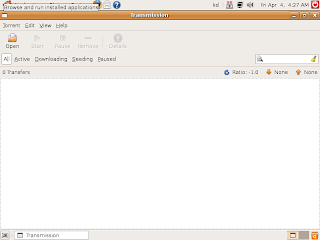
Also included is Transmission which is a very popular BitTorrent client and
// Inkspace a vector graphics editing tool has PDF graphics editing support .
Firefox 3 Beta -- Hmmm this list with name and address bar sucks seriously
Changes in Ubuntu 8.04 includes :
Inclusion of Gnome 2.22
X.org 7.3
Linux kernel 2.6.24-12.13
Pulseaudio
Policykit
Firefox 3 Beta 4
New apps like Transmission , Inkspace , Brasero etc
Brand new firewall
Conclusion : Ubuntu 8.04 Beta promises a lot and is shaping up to be a interesting update .The most important change/addition in 8.04 is simplification of installation procedure with inclusion of tool like Wubi making installation of Ubuntu on Windows based systems really easy. Firefox 3 and Brasero are welcome addition to Ubuntu . Also Ubuntu 8.04 seems pretty nippier and faster compared to the earlier releases . In short Ubuntu 8.04 is turning out to be an update worth waiting for .
Article Written by : Ambuj Varshney (blogambuj@gmail.com) For Linux on Desktop , http://linuxondesktop.blogspot.com (C) 2008 , Ambuj Varshney
You can use 7-Zip on any computer, including a computer in a commercial organization. You dont need to register or pay for 7-Zip. But you can make a donation to support further development of 7-Zip.
The main features of 7-Zip
High compression ratio in 7z format with LZMA and LZMA2 compression
Supported formats:
Packing / unpacking: 7z, XZ, BZIP2, GZIP, TAR, ZIP and WIM
Unpacking only: ARJ, CAB, CHM, CPIO, CramFS, DEB, DMG, FAT, HFS, ISO, LZH, LZMA, MBR, MSI, NSIS, NTFS, RAR, RPM, SquashFS, UDF, VHD, WIM, XAR and Z.
For ZIP and GZIP formats, 7-Zip provides a compression ratio that is 2-10 % better than the ratio provided by PKZip and WinZip
Strong AES-256 encryption in 7z and ZIP formats
Self-extracting capability for 7z format
Integration with Windows Shell
Powerful File Manager
Powerful command line version
Plugin for FAR Manager
Localizations for 79 languages
7z is the new archive format, providing high compression ratio.
The main features of 7z format:
* Open architecture
* High compression ratio
* Strong AES-256 encryption
* Ability of using any compression, conversion or encryption method
* Supporting files with sizes up to 16000000000 GB
* Unicode file names
* Solid compressing
* Archive headers compressing
LZMA compression algorithm is very suitable for embedded applications. LZMA is released under the terms of the GNU LGPL. LZMA is also available under a proprietary license for those who can not use the GNU LGPL in their code. If you want to use LZMA code, you can ask consultations, custom code programming and required developer licenses from page for support: Send message to LZMA developer. Check also information about LZMA SDK.
7-Zip also supports encryption with AES-256 algorithm. This algorithm uses cipher key with length of 256 bits. To create that key 7-Zip uses derivation function based on SHA-256 hash algorithm. A key derivation function produces a derived key from text password defined by user. For increasing the cost of exhaustive search for passwords 7-Zip uses big number of iterations to produce cipher key from text password.
Spartacus (La Guerra de los condenados) - Temporada 3 - Capitulo 04: La Diezma
Spartacus 03x04
Sinopsis: Mira spartacus la guerra de los condenados capitulo 4 de la temporada 3 en español latino online en calidad HD en cualquier momento y lugar completamente gratis. Este capitulo es 3x4: La Diezma...
Spartacus (Guerra de los condenados) capitulo 4 temporada 3, audio latino temporada 3 Spartacus (Guerra de los condenados), ver capitulo 4 de Spartacus (Guerra de los condenados) online, Spartacus temporada 3, español latino, serie completa, todos los capitulos, temporada 3 en español latino, Spartacus (Guerra de los condenados) 3x4